# ⚙️ Backtesting Setup
## Preparing for Your First Backtest[](#preparing-for-your-first-backtest "Direct link to Preparing for Your First Backtest")
Setting up a proper backtest is important for producing useful historical test data. This guide walks through the MT4 Strategy Tester settings used to test BananaEA.
tip
**Goal**: Create a realistic test environment that mimics live trading conditions as closely as possible.
***
## Pre-Backtest Checklist[](#pre-backtest-checklist "Direct link to Pre-Backtest Checklist")
Before starting your backtest, ensure:
* [ ] **EA Installed**: BananaEA .ex4 file in `MQL4/Experts/` folder
* [ ] **Historical Data**: Sufficient price history downloaded
* [ ] **Broker Settings**: Spread and commission configured realistically
* [ ] **Parameters Set**: Input parameters configured or preset loaded
* [ ] **Test Period Selected**: Date range covering appropriate market conditions
* [ ] **Modeling Quality**: "Every Tick" selected for accurate results
***
## Step 1: Install BananaEA[](#step-1-install-bananaea "Direct link to Step 1: Install BananaEA")
### Locating the EA File[](#locating-the-ea-file "Direct link to Locating the EA File")
You'll receive BananaEA as a compiled `.ex4` file:
```
BananaEA.ex4
```
### Installation[](#installation "Direct link to Installation")
**1. Copy EA to MT4 Folder**:
```
1. Open MT4 Data Folder: File → Open Data Folder
2. Navigate to: MQL4 → Experts
3. Copy BananaEA .ex4 file into this folder
4. Restart MT4 (or refresh Navigator: right-click Navigator → Refresh)
```
**2. Verify Installation**:
```
1. Open MT4 Navigator (Ctrl+N)
2. Expand "Expert Advisors" section
3. Look for BananaEA in the list ✅
```
tip
**EA Appears in Navigator**: If you see BananaEA in the Expert Advisors list, installation is successful and it's ready for backtesting!
***
## Step 2: Download Historical Data[](#step-2-download-historical-data "Direct link to Step 2: Download Historical Data")
info
If your DAX/GER40 chart only shows one to three months of history, see [Historical Data For Backtesting](/banana-ea/mt4/docs/v4/backtesting-optimization/historical-data.md) before importing third-party files or relying on generic History Center downloads.
### Check Available History[](#check-available-history "Direct link to Check Available History")
1. Open chart for your test symbol (e.g., GER40.r)
2. Open desired timeframe (e.g., H1)
3. Scroll left to see how far back history goes
4. Aim for at least **2+ years** of data
### Download More History \[Important][](#download-more-history-important "Direct link to Download More History \[Important]")
**Method 1: Broker chart history (Best for broker-specific testing)**
```
1. Log in to the correct broker account/server
2. Tools > Options > Charts
3. Increase Max bars in history and Max bars in chart
4. Restart MT4
5. Open the exact Market Watch symbol on M1
6. Press Home repeatedly or scroll left to request older bars
7. Repeat for the timeframes you need
```
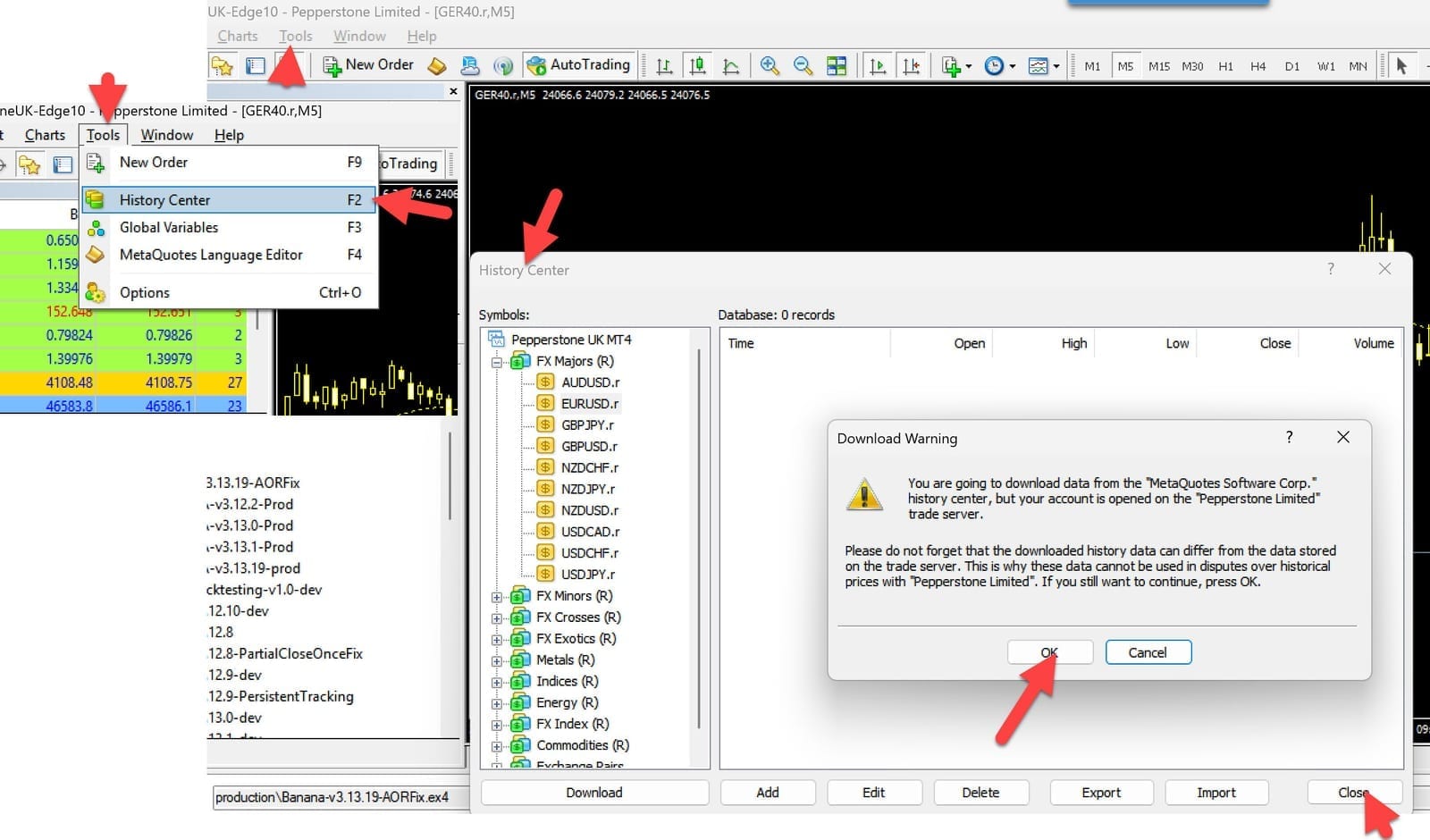
**Method 2: History Center (Use With Caution)**
```
1. Tools → History Center (F2)
2. Find your symbol in list
3. Select timeframe (e.g., 1 Hour)
4. Click "Download" button
5. Wait for download to complete
6. Close History Center
```
warning
History Center downloads may not match your broker's trade server history. For broker-specific BananaEA validation, use the exact broker-server symbol history where possible.
Strategy Tester Basic Settings
**Method 3: Scrolling Back**
```
1. Open chart (e.g., GER40.r H1)
2. Hold Home key or scroll left continuously
3. MT4 loads more history automatically
4. Slow but works for recent history
```
**Method 4: Import from File**
```
If you have .hst files from data provider:
1. Tools → History Center
2. Select symbol and timeframe
3. Click "Import"
4. Select .hst file
5. Verify import successful
```
For CSV exports, `.hst` files, and third-party data limitations, see [Historical Data For Backtesting](/banana-ea/mt4/docs/v4/backtesting-optimization/historical-data.md).
### Data Quality Check[](#data-quality-check "Direct link to Data Quality Check")
After downloading, verify:
```
Open chart for test symbol/timeframe
→ Scroll through history visually
→ Check for gaps (missing bars)
→ Verify prices look realistic
→ Ensure continuous data (no large jumps in time)
```
danger
**Poor Data = Unreliable Results**: Gaps, missing bars, or corrupted data will produce meaningless backtest results. Always verify data quality first.
***
## Step 3: Configure Strategy Tester Settings[](#step-3-configure-strategy-tester-settings "Direct link to Step 3: Configure Strategy Tester Settings")
### Basic Configuration[](#basic-configuration "Direct link to Basic Configuration")
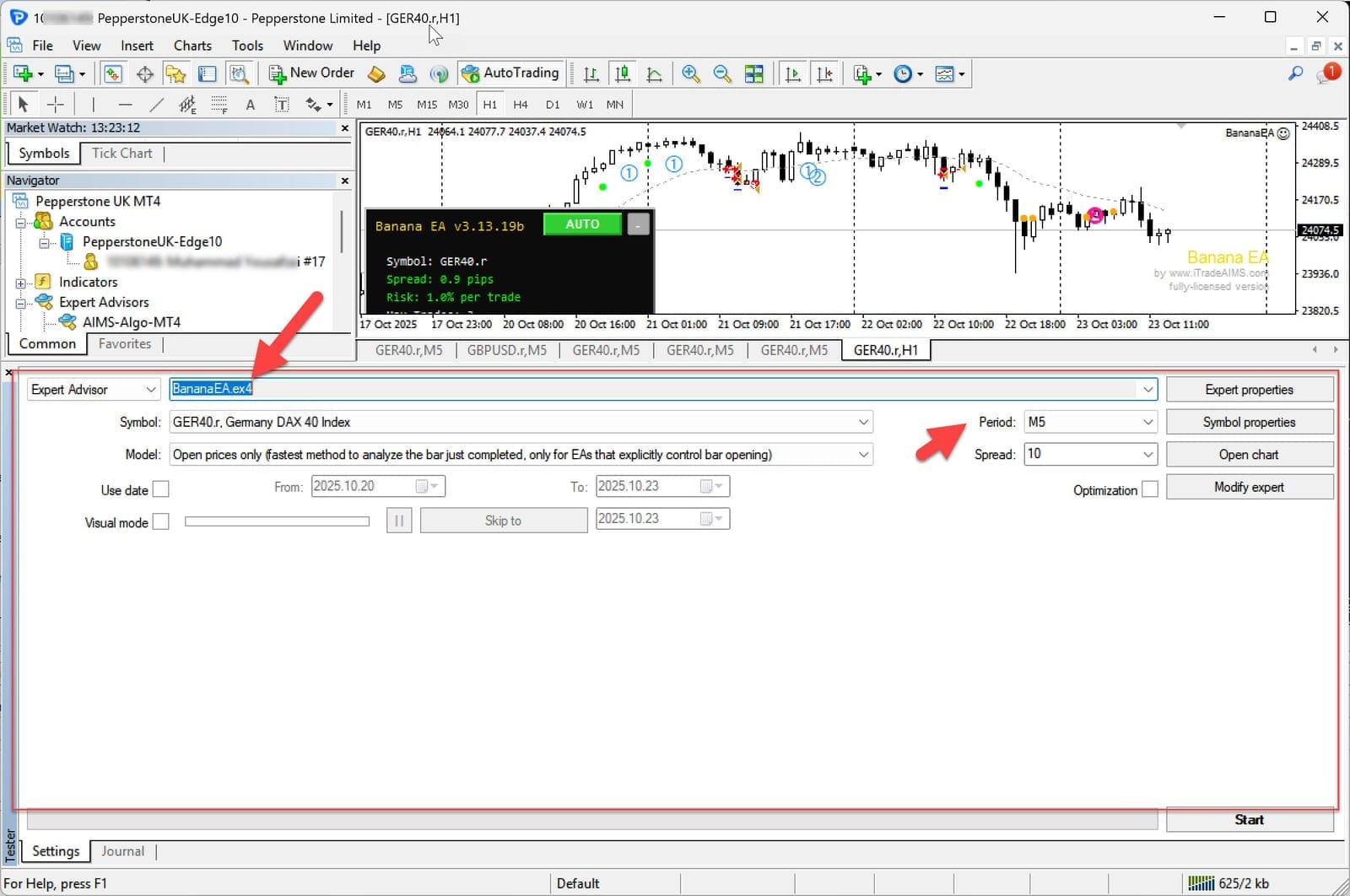
Open Strategy Tester (`Ctrl+R`) and configure:
**Expert Advisor**: Select BananaEA
**Symbol**: GER40.r (or your preferred symbol)
**Period**: H1 (recommended for BananaEA)
**Model**: Every Tick (for accurate results)
**Spread**: 10-15 points i.e 1 to 1.5 pips (realistic for DAX)
Strategy Tester Basic Settings
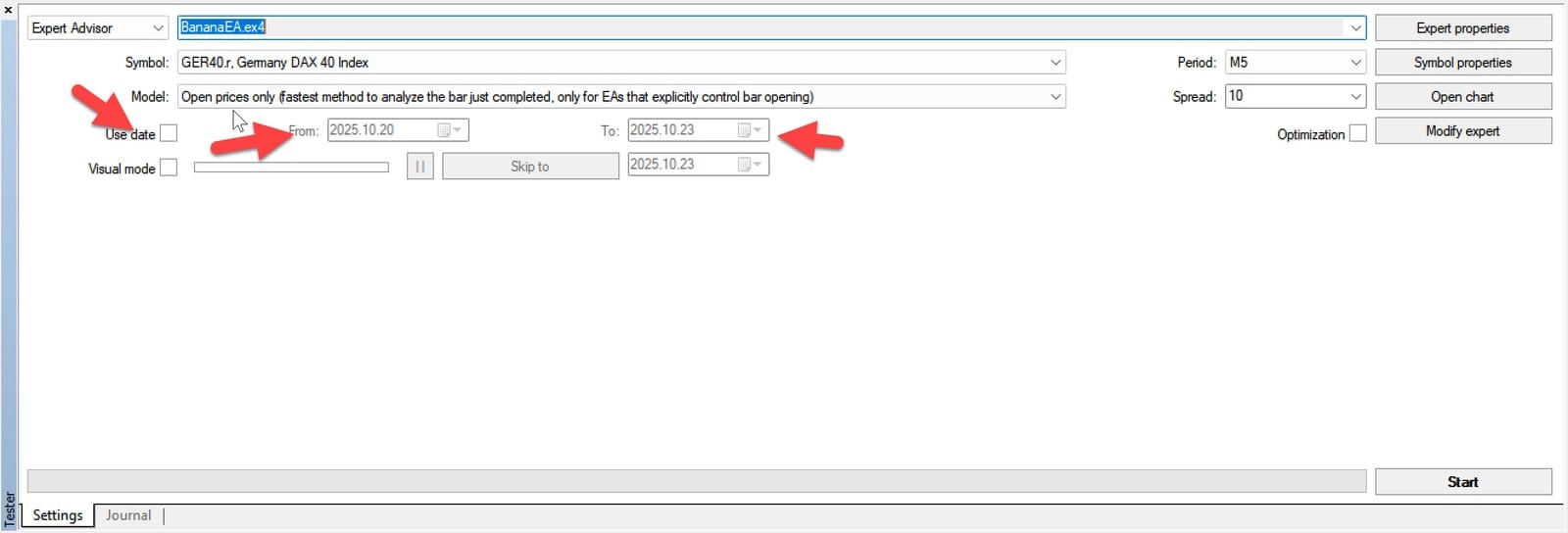
### Date Range Selection[](#date-range-selection "Direct link to Date Range Selection")
**Conservative Approach (Recommended)**:
```
From: 2023.01.01 (2 years ago)
To: 2025.01.01 (or today's date)
Duration: 2 years
Market Conditions: Mix of trends, ranges, volatility
```
**Comprehensive Approach (Advanced)**:
```
From: 2020.01.01 (5+ years ago)
To: 2025.01.01
Duration: 5+ years
Market Conditions: Includes COVID crash, recovery, recent trends
```
Strategy Tester Date Range Settings
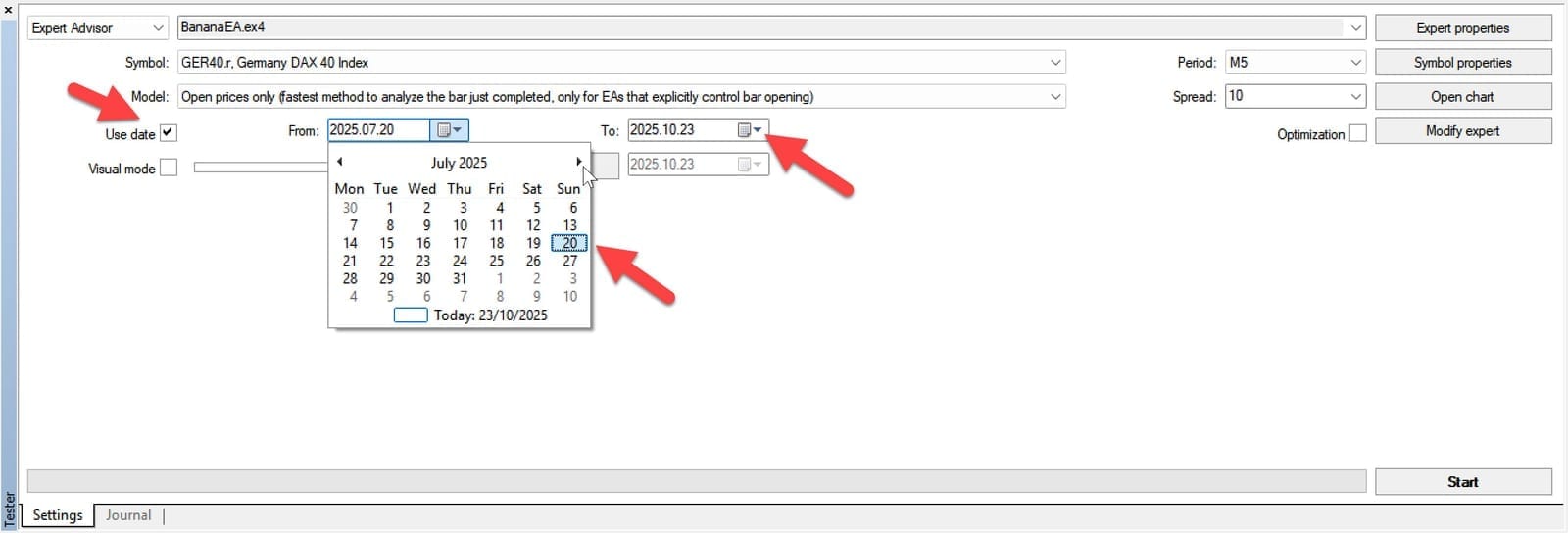
**Quick Screening (Initial Testing)**:
```
From: 2024.07.01 (6 months ago)
To: 2025.01.01
Duration: 6 months
Purpose: Quick parameter validation
```
Strategy Tester Date Range Settings
info
**Recommendation**: Start with 6 months for quick screening, then extend to 2+ years for validation.
***
## Step 4: Configure EA Parameters[](#step-4-configure-ea-parameters "Direct link to Step 4: Configure EA Parameters")
### Option A: Use Default Parameters[](#option-a-use-default-parameters "Direct link to Option A: Use Default Parameters")
**When to Use**:
* First-time testing
* Evaluating baseline performance
* Comparing changes against known baseline
**How**: Simply leave all parameters at their default values (shown in Inputs tab).
***
### Option B: Load Preset Configuration[](#option-b-load-preset-configuration "Direct link to Option B: Load Preset Configuration")
**When to Use**:
* Testing optimized parameter sets
* Comparing different strategies (conservative, aggressive)
* Replicating published backtest results
**How to Load Preset**:
```
1. In Strategy Tester, click "Inputs" tab
2. Right-click in inputs area
3. Select "Load"
4. Navigate to: MQL4/Presets/
5. Select preset file (e.g., "BananaEA-DAX-H1-Conservative.set")
6. Click "Open"
7. Verify parameters loaded correctly
```
**Available Presets** (Example):
* `BananaEA-DAX-M5-Default.set` - Lower risk, stable
* `BananaEA-DAX-H1-Balanced.set` - Default recommended
* `BananaEA-DAX-H1-Aggressive.set` - Higher risk/reward
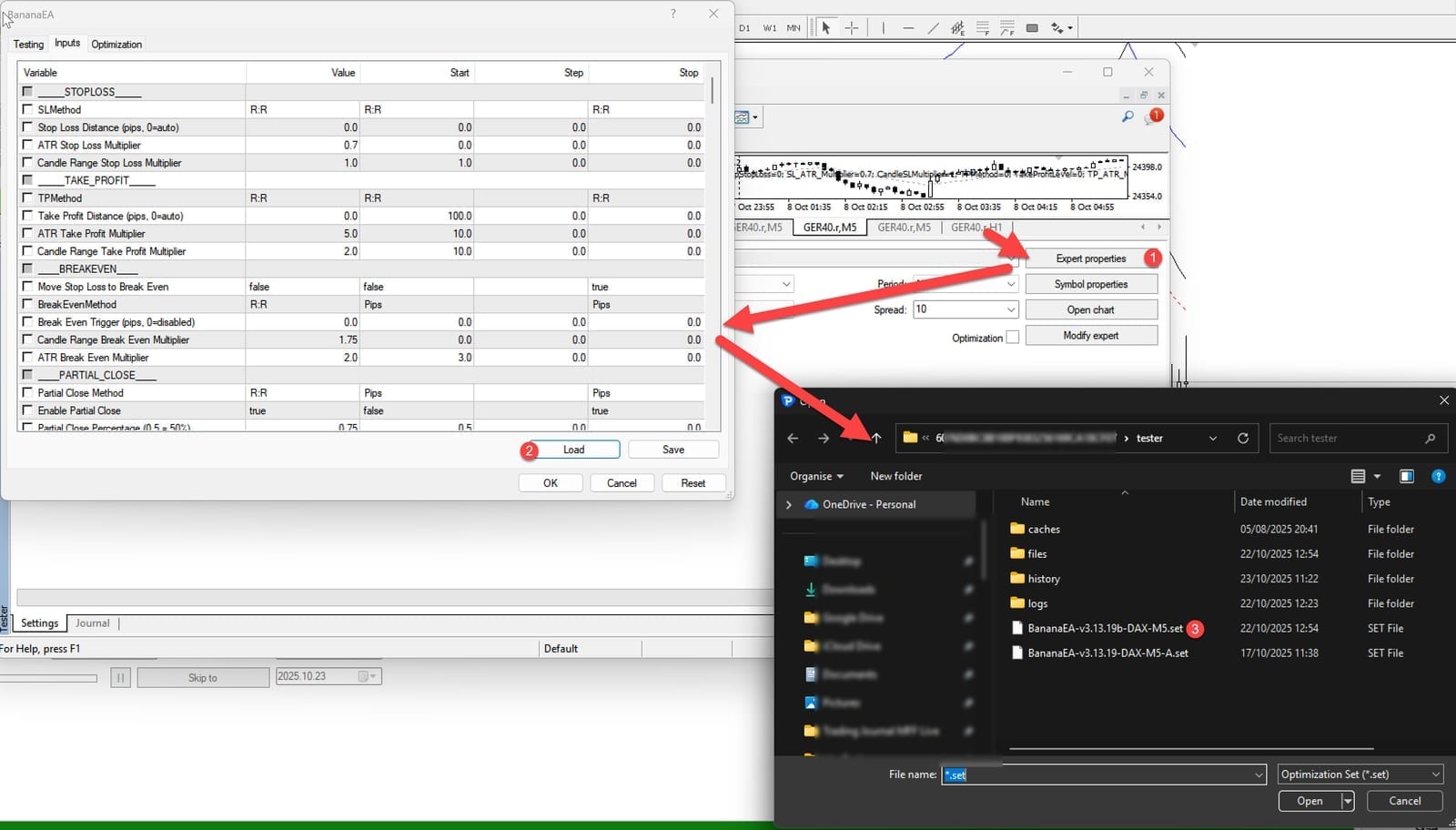
Example EA parameter configuration in Strategy Tester
***
### Option C: Manual Configuration[](#option-c-manual-configuration "Direct link to Option C: Manual Configuration")
**When to Use**:
* Testing specific parameter changes
* Optimization follow-up
* Custom strategy validation
**Key Parameters to Configure**:
#### Risk Management[](#risk-management "Direct link to Risk Management")
```
RiskPercent = 1.0 // Risk per trade (1-3% typical)
RiskMethod = 0 // 0=Risk%, 1=RiskAmount, 2=FixedLots
MaxOpenTrades = 1 // Maximum simultaneous positions
```
#### Entry Settings[](#entry-settings "Direct link to Entry Settings")
```
SignalSourceType = 1 // 1=Internal Banana patterns
Use Banana Signals = true // Enable Banana pattern signals
Use Seed Signals = false // Disable Seed patterns
```
#### Stop Loss / Take Profit[](#stop-loss--take-profit "Direct link to Stop Loss / Take Profit")
```
SLMethod = 0 // 0=CandleRange, 1=ATR, 2=Fixed
TPMethod = 0 // 0=CandleRange, 1=ATR, 2=Fixed
CandleRangeSL = 10 // Candles to include for SL
CandleRangeTP = 20 // Candles to include for TP
```
#### Trade Management[](#trade-management "Direct link to Trade Management")
```
UseSLtoBE = true // Enable break-even
BreakEvenMethod = 2 // 2=ATR-based (recommended)
UsePartialClose = true // Enable partial profit taking
UseTrailing = true // Enable trailing stop
```
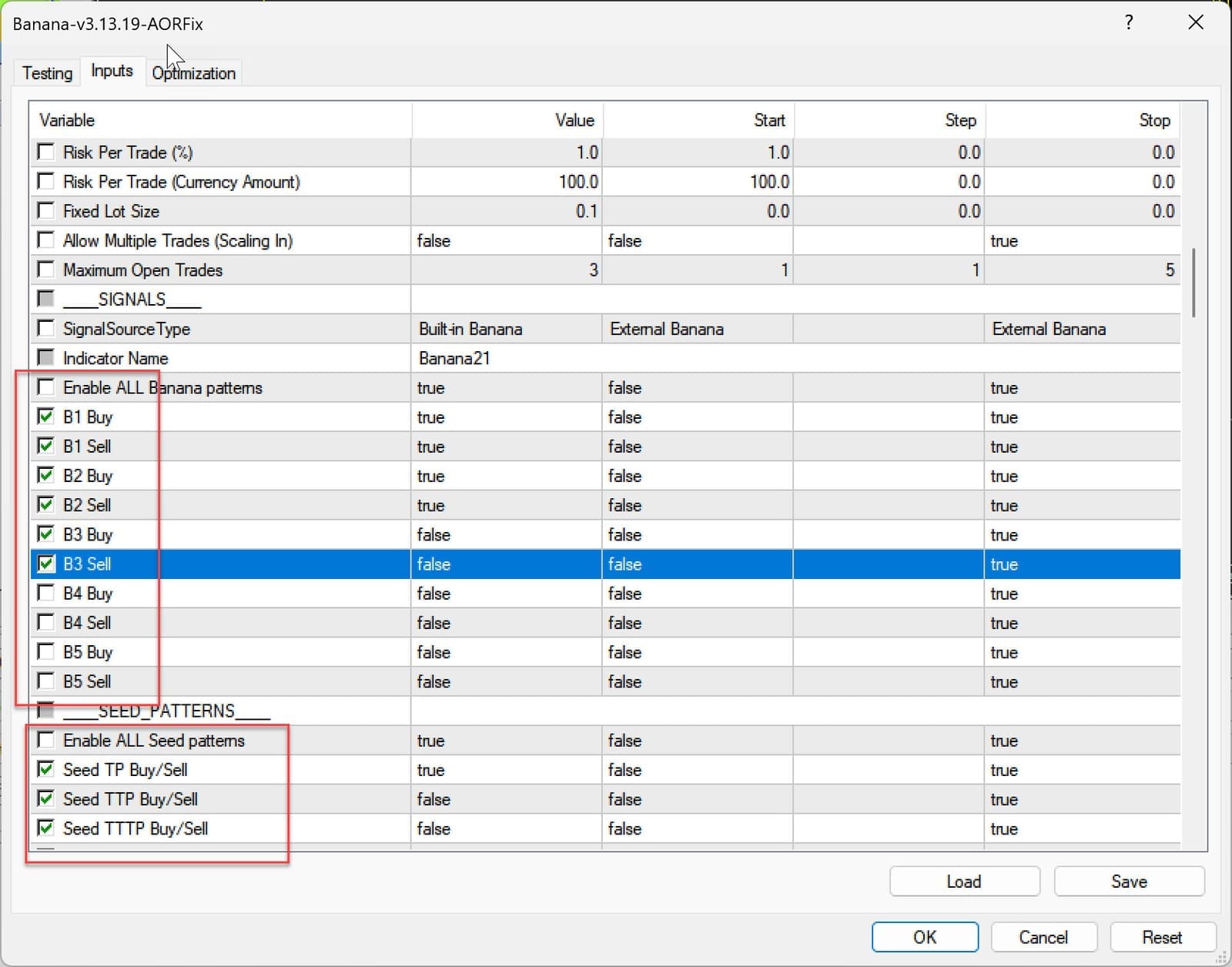
Example EA parameter configuration in Strategy Tester
***
## Step 5: Configure Broker Costs[](#step-5-configure-broker-costs "Direct link to Step 5: Configure Broker Costs")
### Spread Configuration[](#spread-configuration "Direct link to Spread Configuration")
**Finding Your Broker's Spread**:
```
1. Open live chart for symbol
2. Look at Market Watch or chart info
3. Note current spread (e.g., 1.5 pips = 15 points)
4. Add buffer for peak times (+50%)
5. Set in Strategy Tester: 20 points
```
**Conservative Approach** (Recommended): Use **higher** spread than average to account for:
* Peak hour widening
* News event spikes
* Slippage simulation
* Realistic live conditions
**Example for DAX (GER40)**:
```
Typical spread: 1.0-1.5 pips (10-15 points)
Peak spread: 2.0-3.0 pips (20-30 points)
Backtest setting: 20 points (conservative but realistic)
```
***
### Commission & Swap[](#commission--swap "Direct link to Commission & Swap")
**Enable Commission** (if your broker charges):
```
Strategy Tester → Settings tab
→ Advanced options
→ Commission: [X.XX] per lot/side
```
**Example Commission Rates**:
* Prop firms: $0-5 per side per lot
* Retail brokers: Often spread-only (no commission)
* ECN brokers: $2-7 per side per lot
**Swap/Rollover** (if holding overnight):
```
MT4 automatically uses symbol's swap rates
→ No manual configuration needed
→ Check: Symbols → Properties → Swap Long/Short
```
info
**BananaEA Typical**: Intraday trading style usually closes before day end, minimal swap impact. However, always enable for accuracy.
***
## Step 6: Set Initial Deposit[](#step-6-set-initial-deposit "Direct link to Step 6: Set Initial Deposit")
**Field**: Initial Deposit (in Strategy Tester settings)
**Recommendations**:
**Match Your Real Capital**:
```
If trading with $10,000 → Set initial deposit to $10,000
If trading with $5,000 → Set initial deposit to $5,000
```
**Why This Matters**:
* Realistic drawdown assessment
* Accurate lot size calculation
* Margin requirement validation
* Risk percentage accuracy
**Typical Amounts**:
* **$5,000**: Small account, conservative risk
* **$10,000**: Standard account, balanced risk
* **$25,000**: Larger account or prop trading
* **$50,000+**: structured/advanced
warning
**Don't Test with Unrealistic Amounts**: Testing with $1M when you have $5K gives misleading results. Risk management scales differently.
***
## Step 7: Configure Leverage[](#step-7-configure-leverage "Direct link to Step 7: Configure Leverage")
**Field**: Leverage (in Strategy Tester settings)
**BananaEA Recommendations**:
**Conservative**: 1:30 leverage
**Standard**: 1:50 leverage
**Aggressive**: 1:100 leverage
**Match Your Broker**: Check your live account leverage and use same in backtests.
***
## Step 8: Double-Check Everything[](#step-8-double-check-everything "Direct link to Step 8: Double-Check Everything")
### Pre-Launch Checklist[](#pre-launch-checklist "Direct link to Pre-Launch Checklist")
Before clicking **\[Start]**, verify:
**EA Configuration**:
*
Correct EA selected in dropdown
*
Parameters loaded/set correctly
*
Magic number unique (if testing multiple EAs)
**Symbol & Timeframe**:
*
Correct symbol (GER40.r for DAX testing)
*
Correct period (H1 recommended)
*
Historical data sufficient (2+ years)
**Test Settings**:
*
Modeling quality: "Every Tick"
*
Spread realistic (15-20 points for DAX)
*
Date range appropriate (2+ years)
*
Initial deposit matches real capital
**Advanced Settings**:
*
Commission configured (if applicable)
*
Leverage matches broker
*
Optimization OFF (unless optimizing)
*
Visual mode OFF (for full speed)
***
## Common Setup Mistakes[](#common-setup-mistakes "Direct link to Common Setup Mistakes")
### Mistake 1: Using Wrong Spread[](#mistake-1-using-wrong-spread "Direct link to Mistake 1: Using Wrong Spread")
❌ **Problem**: Spread set to 0 or 1 point
✅ **Solution**: Use realistic spread (15-20 points for DAX)
### Mistake 2: Insufficient Data[](#mistake-2-insufficient-data "Direct link to Mistake 2: Insufficient Data")
❌ **Problem**: Testing on 1-3 months of data
✅ **Solution**: Use minimum 6-12 months, ideally 2+ years
### Mistake 3: Wrong Modeling Quality[](#mistake-3-wrong-modeling-quality "Direct link to Mistake 3: Wrong Modeling Quality")
❌ **Problem**: Using "Open Prices Only" for final validation
✅ **Solution**: Use "Every Tick" mode for accurate results
### Mistake 4: Mismatched Capital[](#mistake-4-mismatched-capital "Direct link to Mistake 4: Mismatched Capital")
❌ **Problem**: Testing with $100K when trading with $5K
✅ **Solution**: Match initial deposit to real account size
### Mistake 5: Ignoring Trading Costs[](#mistake-5-ignoring-trading-costs "Direct link to Mistake 5: Ignoring Trading Costs")
❌ **Problem**: Not including commission or swap
✅ **Solution**: Configure all broker costs for realistic results
***
## Quick Setup Guide (Checklist)[](#quick-setup-guide-checklist "Direct link to Quick Setup Guide (Checklist)")
Copy this workflow for consistent backtests:
```
1. [ ] Install BananaEA .ex4 file in MQL4/Experts folder
2. [ ] Download 2+ years historical data
3. [ ] Open Strategy Tester (Ctrl+R)
4. [ ] Select BananaEA from EA dropdown
5. [ ] Symbol: GER40.r (or preferred)
6. [ ] Period: H1
7. [ ] Model: Every Tick
8. [ ] Spread: 20 points
9. [ ] Dates: 2023.01.01 to 2025.01.01
10. [ ] Initial Deposit: $10,000 (or your amount)
11. [ ] Load preset or configure parameters
12. [ ] Enable commission (if applicable)
13. [ ] Verify leverage matches broker
14. [ ] Click [Start]
```
***
## Next Steps[](#next-steps "Direct link to Next Steps")
Now that your backtest is properly configured:
1. **Run Your Backtest** → [Running Backtests](/banana-ea/mt4/docs/v4/backtesting-optimization/running-backtests.md)
2. **Analyze Results** → [Analyzing Results](/banana-ea/mt4/docs/v4/backtesting-optimization/analyzing-results.md)
3. **Try Optimization** → [Running Optimizations](/banana-ea/mt4/docs/v4/backtesting-optimization/running-optimizations.md)
tip
**Structured approach**: Taking time to set up correctly makes the test easier to review and easier to reproduce later.
***
## Related Resources[](#related-resources "Direct link to Related Resources")
* [MT4 Strategy Tester Guide](/banana-ea/mt4/docs/v4/backtesting-optimization/strategy-tester-guide.md) - Interface walkthrough
* [Introduction to Backtesting](/banana-ea/mt4/docs/v4/backtesting-optimization/introduction.md) - Fundamentals
* [Best Practices & Tips](/banana-ea/mt4/docs/v4/backtesting-optimization/best-practices.md) - structured workflow