What Bubble EA does
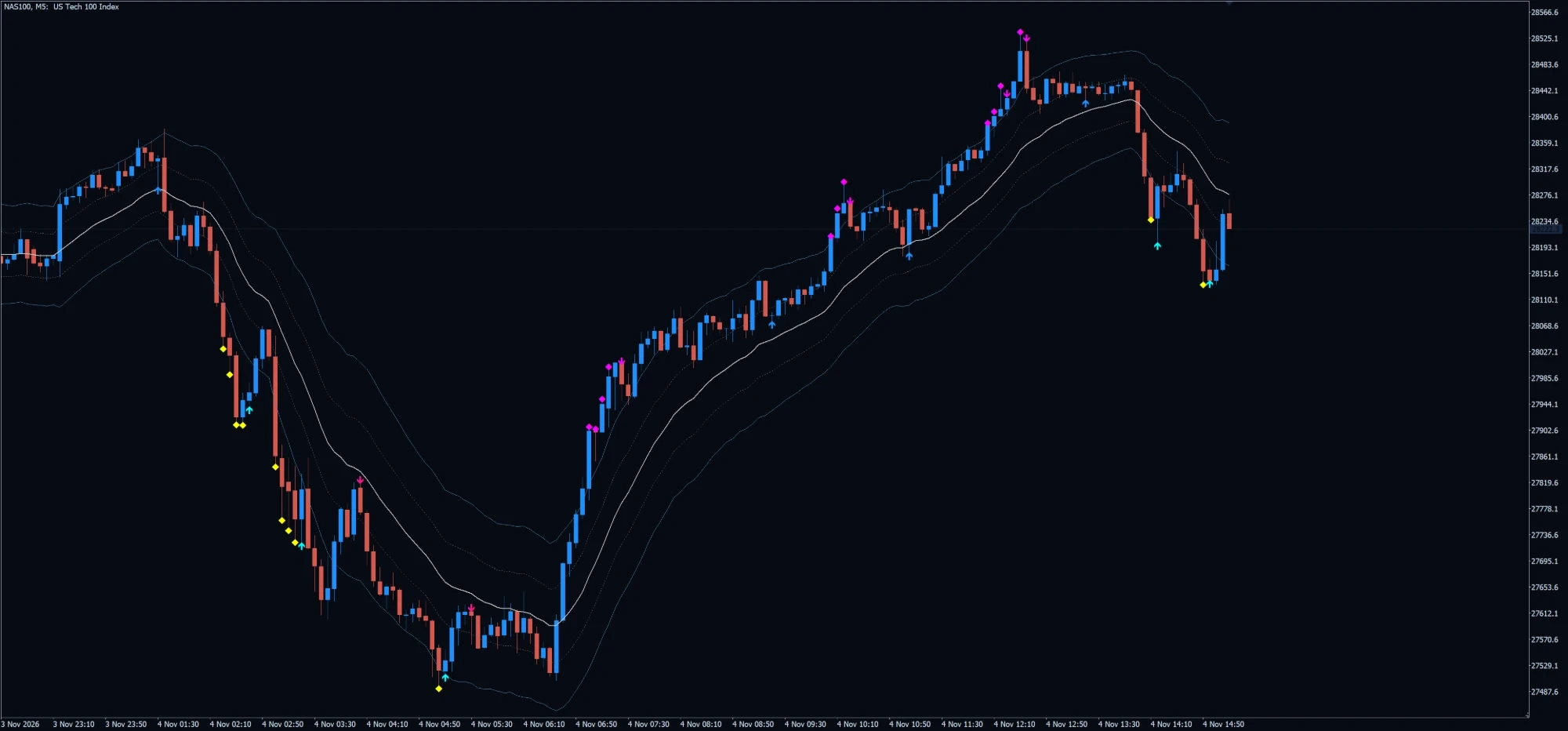
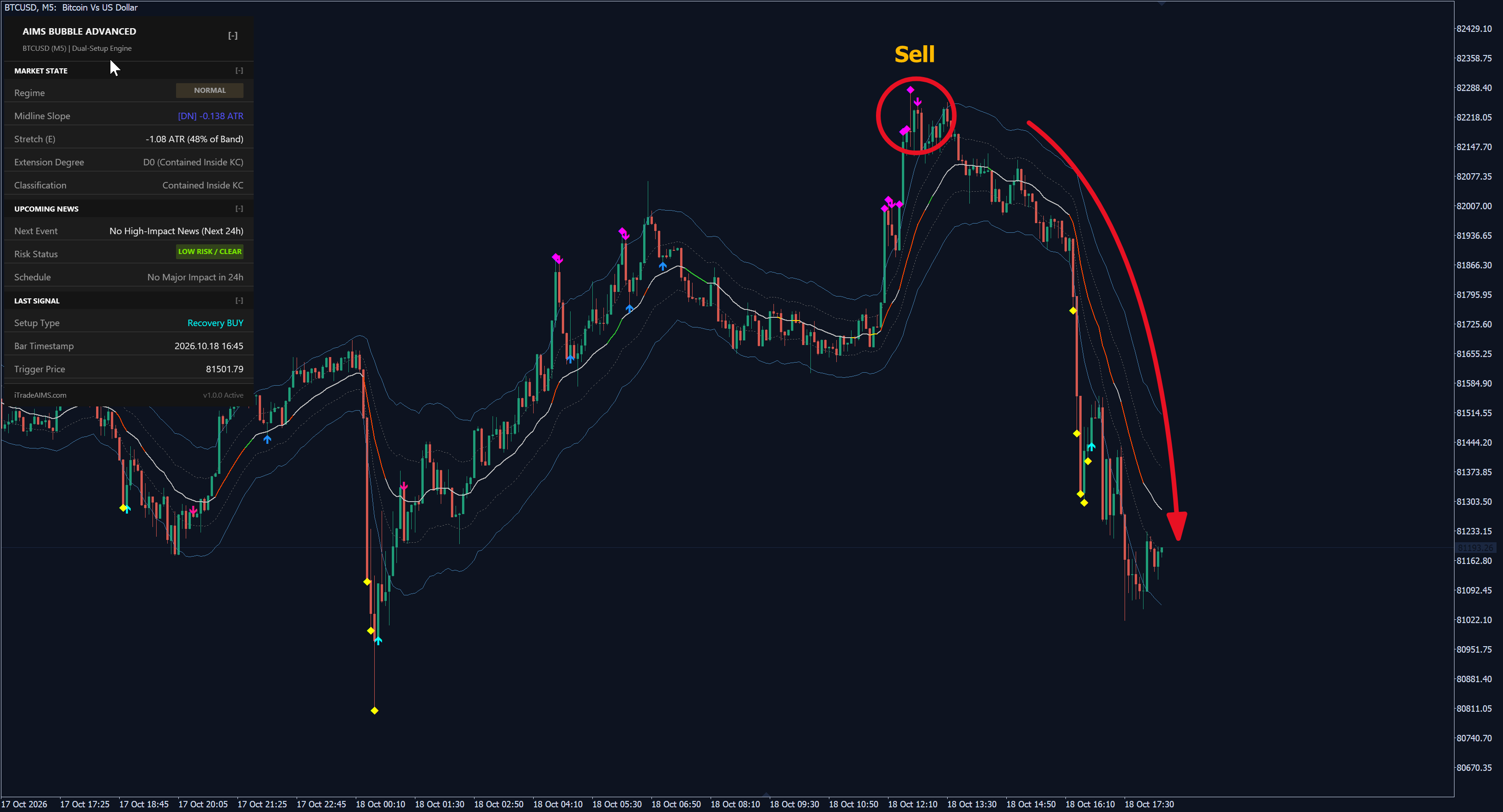
AIMS Bubble EA measures how far price has stretched from a 20 EMA midline in ATR(20) units. It trades the turn after an extreme stretch, and the pullback into the centre band after a strong trend move.
Exhaustion Reversal
A stretch of 2.25 ATR or more, with price at the 20-period Bollinger Band, Stochastic below 20 (above 80) and RSI below 30 (above 70), arms the setup. The first recovery candle within 3 bars triggers it.
Centre-Band Snap-Back
After price stretches past 2.25 ATR in a trend, the first pullback into the centre band (1.0 ATR) or the midline, with the midline sloping the same way and a candle closing in the trend direction, triggers a continuation entry.
Free Trade and Midline Trail
At +1R the EA closes half the position. The runner’s stop then trails the 20 EMA midline, forward only. There is no fixed take profit.
How to trade Bubble EA
Attach and License
Attach the EA to the chart of the symbol you want to trade and enter your Serial Key in Inputs. Without a valid key it places no orders.
Choose the Setups
Trade reversals, snap-backs or both. On MT5 the Regime Guard and BandRide Guard further switch setups off when the market does not suit them.
Set Risk and Session
Choose risk % or a fixed lot, and the session window in server time. New entries only happen inside the session.
Let It Manage
The EA places a stop order beyond the signal bar, deletes it after 3 bars if unfilled, and banks half at +1R.
Setups and chart grammar
Signals are read on closed bars. E is the distance from the 20 EMA midline in ATR(20) units.
| Setup | Context | What the EA sees | Goal |
|---|---|---|---|
| Reversal Buy | E at or below -2.25, price at the lower Bollinger Band, Stochastic < 20, RSI < 30 | Within 3 bars: a bull candle, an inside bar or a bullish recovery pattern | Buy Stop 1 pip above the signal bar high, stop loss below the low |
| Reversal Sell | E at or above +2.25, price at the upper Bollinger Band, Stochastic > 80, RSI > 70 | Within 3 bars: a bear candle, an inside bar or a bearish recovery pattern | Sell Stop 1 pip below the signal bar low, stop loss above the high |
| Snap-Back | Price stretched past 2.25 ATR in the trend direction within the last 20 bars | Pullback into the centre band or midline, midline sloping with the trend, candle closing with the trend | Stop order 1 pip beyond the signal bar in the trend direction |
| Risk Gate | Every signal | Entry-to-stop distance | Skip the setup if it is wider than 2.5 ATR |
Oversold reversal or bullish snap-back.
Overbought reversal or bearish snap-back.
Half banked at +1R; the runner trails the midline.
No valid Serial Key: no orders.
Settings
| Input | Type | Default | What it does |
|---|---|---|---|
| Serial Key | String | (empty) | Licence key from the member portal. Without a valid key the EA stays locked. |
| Auto-Profile | Boolean | true | Picks a profile and magic-number offset for the chart symbol. |
| Strategy Mode | Enum | Both | Exhaustion Reversal only, Snap-Back only, or Both. |
| Operating Mode | Enum | Current Chart | Current Chart trades the chart symbol. Alpha 4 Portfolio trades several symbols from one chart. |
| Portfolio max open risk / trades | Float / Integer | 3.0% / 4 | Global caps in Alpha 4 Portfolio mode. |
| Portfolio ticker overrides | String | (empty) | Optional broker symbol names for US30, NAS100, Gold and FX in portfolio mode. |
| Snap-Back Touch | Enum | Centre Band | Centre Band (within 1.0 ATR, or a midline touch) or strict 20 EMA touch. |
| Reversal Model | Enum | 4-Pillar | 4-Pillar Confluence, or Grimes Band Poke (stretch of 2.25 ATR alone). |
| BandRide Guard | Boolean | true | Blocks reversals while price rides the band in a runaway trend. |
| Regime Guard | Boolean | true | No reversals in a trending regime; no snap-backs in a low-volatility range. |
| Execution Type | Enum | Pending Stop | Pending stop beyond the signal bar, or a market order at bar close. |
| Trailing Method | Enum | 20 EMA Midline | 20 EMA Midline or None. |
| Max concurrent runners | Integer | 2 | Maximum open trades on this chart. |
| Session Filter | Boolean | true | Restricts new entries to the session window. Open runners are kept beyond it. |
| Session start / end | String | 08:00 / 17:30 | Session window in broker server time (HH:MM). |
| Risk % sizing | Boolean | true | Sizes each trade from the distance to its stop loss. |
| Risk % per trade | Float | 1.0 | Percentage of balance risked per trade when risk sizing is on. |
| Fixed lot | Float | 0.10 | Lot size when risk sizing is off. |
| Max spread (pips) | Float | 25.0 | No new order while the spread is wider than this. |
| Max slippage (points) | Integer | 30 | Maximum slippage accepted on execution. |
| Magic number | Integer | 108200 | Identifies this EA’s trades. Auto-Profile adds a per-symbol offset. |
| Input | Type | Default | What it does |
|---|---|---|---|
| Serial Key | String | (empty) | Licence key from the member portal. Without a valid key the EA stays locked. |
| Auto-Profile | Boolean | true | Picks a profile and magic-number offset for the chart symbol. |
| Strategy Mode | Enum | Both | Exhaustion Reversal only, Snap-Back only, or Both. |
| Trailing Method | Enum | Midline | Keltner Midline (20 EMA), Alligator Teeth, ATR, or None. |
| Max concurrent runners | Integer | 2 | Maximum open trades on this chart. |
| Session Filter | Boolean | true | Restricts new entries to the session window. Open runners are kept beyond it. |
| Session start / end | String | 08:00 / 17:30 | Session window in broker server time (HH:MM). |
| Risk % sizing | Boolean | true | Sizes each trade from the distance to its stop loss. |
| Risk % per trade | Float | 1.0 | Percentage of balance risked per trade when risk sizing is on. |
| Fixed lot | Float | 0.10 | Lot size when risk sizing is off. |
| Max spread (pips) | Float | 25.0 | No new order while the spread is wider than this. |
| Max slippage (points) | Integer | 30 | Maximum slippage accepted on execution. |
| Magic number | Integer | 108200 | Identifies this EA’s trades. Auto-Profile adds a per-symbol offset. |
Frequently asked questions
Both trade the same two setups with the same Free Trade rule. MT5 adds the Alpha 4 Portfolio mode, the Regime and BandRide guards and a market-order option. MT4 offers Teeth and ATR trailing as well as the midline. On MT4 a reversal’s stop loss sits beyond the lower of the signal and climax bars.