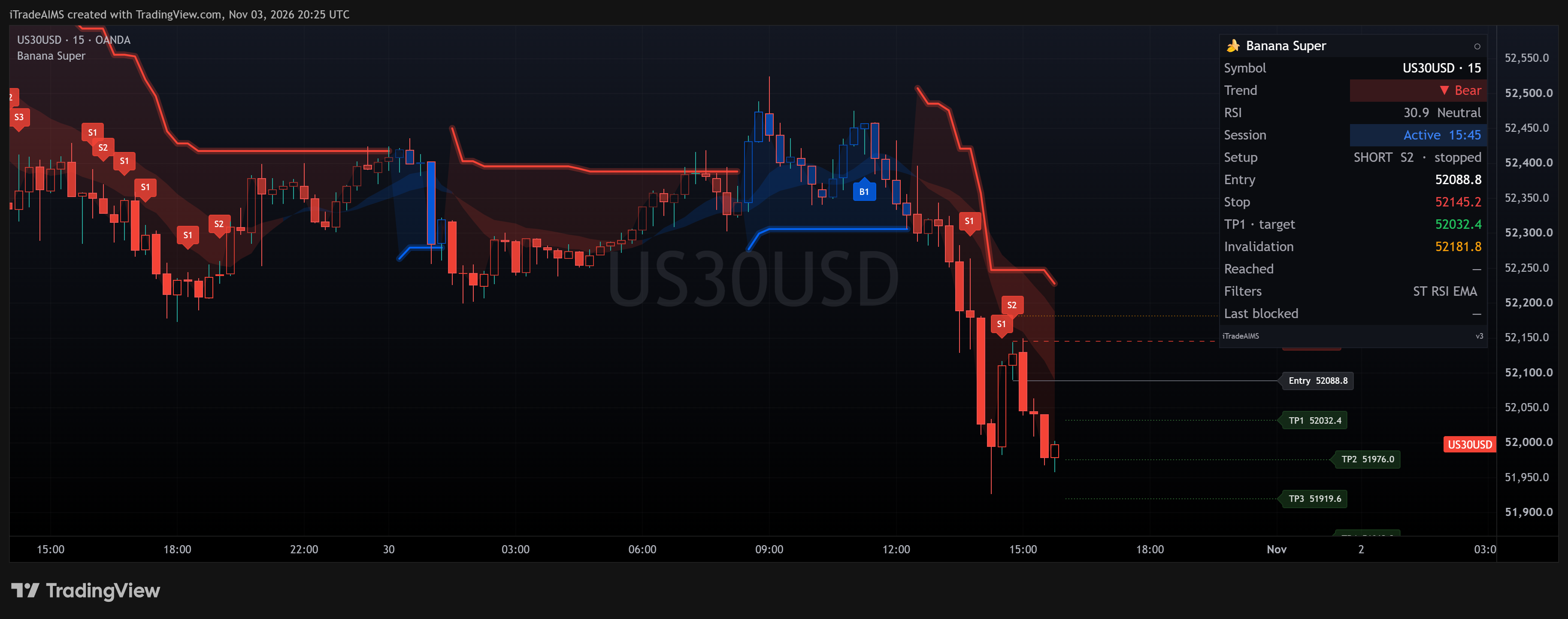
What Banana EA does
Banana EA trades trend continuation. After a short impulse of rising (or falling) highs, it waits for one to three pullback bars, checks the trend with EMAs, and places a stop order beyond the signal bar.
B1, B2 and B3 Pullbacks
Two rising highs, then one (B1), two (B2) or three (B3) bars pulling back. Each pattern can be switched on or off. Sells mirror the rules.
Trend and Range Filters
By default the signal bar must sit above EMA 21 and EMA 70 with the EMAs in order for a buy. Entries are also skipped when today’s range is over 125% of the 20-day average, or price has moved more than 25% of it since the session started.
Staged Trade Management
Each trade has a stop loss, a take profit, a break-even step, three partial-close levels and an ATR trailing stop. Each is set by a method (such as ATR, R:R or pips) and a value.
How to trade Banana EA
Attach and License
Attach Banana EA to the chart, enter your Serial Key in Inputs and load the .set file for your account. The dashboard appears on the chart.
Start from the Dashboard
The EA does not trade the moment it is attached. Press AUTO on the dashboard to start. On an unattended VPS, set Start Active on Attach to true.
Set Risk and Sessions
Risk defaults to 1% per trade. Trading is limited to two sessions in server time, 10:00–13:00 and 16:15–17:45 by default. Check them against your broker’s clock.
Let It Manage
The EA places pending stops, cancels them after 8 bars if unfilled, and runs the partial closes, break-even and trailing stop on open trades.
Setups and chart grammar
Signals are read on closed bars. Rules below are for buys; sells mirror them.
| Setup | Context | What the EA sees | Goal |
|---|---|---|---|
| B1 | Two rising highs (impulse) | One bar with a lower high and a lower low | Buy Stop 1.0 pip above the signal bar high |
| B2 | Two rising highs (impulse) | Two pullback bars, each with a lower high and a lower low | Buy Stop 1.0 pip above the signal bar high |
| B3 | Two rising highs (impulse) | Three bars of lower highs, the last with a lower low | Buy Stop 1.0 pip above the signal bar high |
| Filters | Every signal | Signal bar low above EMA 21 and EMA 70, EMAs in order; entry above the 10:00 bar close; daily range below 125% of ADR(20) | Skip the signal if any filter fails |
B1–B3 buy above the EMAs, inside a session.
B1–B3 sell below the EMAs, inside a session.
Trading started from the dashboard.
Outside a session, against the trend or past the daily range limit.
Settings
| Input | Type | Default | What it does |
|---|---|---|---|
| License: Serial Key | String | (empty) | Licence key from the member portal. Without a valid key the EA does not trade on a live or demo account. |
| Account Phase | Enum | Challenge | Challenge, Verification, Funded or Personal. Challenge Mode (off by default) scales lots and stops at the profit target only in Challenge and Verification. |
| Lot Method / Risk Per Trade | Enum / Float | % Risk / 1.0 | Risk per trade as % Risk, $ Amount or Lots, depending on the method. |
| Use B1 / B2 / B3 · Seed TP / TTP | Boolean | true / true / true · false / false | Turns each pullback pattern on or off. The Seed patterns are optional and off by default. |
| Buy / Sell Entry Buffer | Pips | 1.0 / 0.1 | Distance of the pending stop beyond the signal bar high (buy) or low (sell). |
| Cancel PO Bars | Integer | 8 | Pending orders not filled after this many bars are cancelled (0 = never). |
| SL Method / Value | Enum / Float | R:R / 1.0 | Stop-loss method (R:R = a multiple of the signal candle range, ATR or Pips) and its value. |
| TP Method / Value | Enum / Float | ATR / 5.0 | Take-profit method (Disabled, R:R, ATR or Pips) and its value. |
| Break Even Method / Value | Enum / Float | ATR / 2.0 | When the stop moves to break-even (Disabled, Pips, R:R or ATR). |
| Partial Close Method · PC1 / PC2 / PC3 | Enum · Fraction @ trigger | ATR · 50% @ 1.0 · 25% @ 2.0 · 25% @ 3.0 | Unit for the three partial-close triggers (Disabled, Pips, R:R or ATR). PC1 closes a share of the current lots; PC2 and PC3 close a share of the remaining lots. |
| Trailing Stop Method | Enum | ATR | Disabled, Pips, ATR, Bars, R:R or MA. |
| Trail Activation / Distance | Float | 5.0 / 2.0 | Profit at which trailing starts, and how far behind price it trails (ATR multiples for the ATR method). |
| ATR Period | Integer | 20 | ATR period for the SL, TP and trailing calculations. |
| Session 1 / Session 2 | Server time | 10:00–13:00 / 16:15–17:45 | New entries only inside these windows. |
| Slow / Slowest EMA Filter | Boolean / Integer | on 21 / on 70 | Signal bar low must be above the EMA for a buy (high below for a sell). Strict EMA order is on. |
| Open Price Filter | Boolean / Hour | true / 10 | Buys only above the close of the 10:00 bar, sells only below it. |
| Daily Range Filter | Boolean / % | true / 125% | Skips entries when today’s range exceeds this share of the 20-day average daily range. |
| Start Active on Attach | Boolean | false | Starts trading on attach without pressing AUTO (for an unattended VPS). |
| Enable Daily DD Control / Max Daily Loss % | Boolean / % | false / 4.0 | When on, trading stops for the day once the daily loss reaches this limit. Close All Trades on DD (true) also closes the EA’s open trades. |
| Max Consecutive Losses / Re-Entry Cooldown After Loss | Integer / Minutes | 0 / 0 (off) | Pauses new entries after this many losses in a row, until the next server day. The cooldown blocks fresh entries for N minutes after a losing close. |
| Scale-In Mode / Maximum Open Trades | Enum / Integer | Disabled / 3 | When a second same-direction trade is allowed (Free, After BE, After PC1, After BE or PC1, After BE and PC1), and the cap on open trades. |
| UseMagicNumberFilter / Magic | Boolean / Integer | true / 40001 | Manages only Banana EA’s own trades, marked with this magic number. |
Frequently asked questions
This page documents the MetaTrader 4 version, v6.7. The MetaTrader 5 version will be added here later. The older v4 and v5 manuals are retired.