What Hunt Dot does
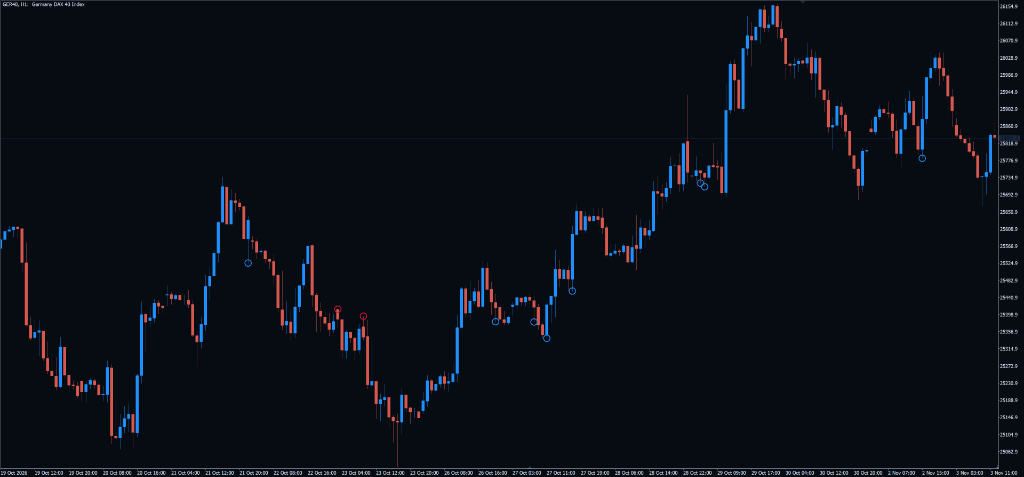
Hunt Dot is the inside-bar member of The Hunt family. It marks a bar that closes inside the previous bar’s range while Grant’s AO is in an active zone and price closes on the trend side of the Purple Magic line and Gator Lips.
Inside Bar Pullback Detection
A bar whose high and low stay within the previous bar’s range, and whose range passes the volatility ceiling.
Grant’s AO Momentum Zones
A Bull Dot needs an active Grant’s AO long zone, a Bear Dot an active short zone. The AO zones are built into the indicator.
"Look For Better" Optimization
Within one AO zone, a later Bull Dot needs a lower high than the last one (a Bear Dot a higher low), so repeat dots only print at better prices.
How to trade Hunt Dot
Attach and Activate
Attach Hunt Dot to your chart and enter your Serial Key in InpSerialKey.
Keep the Trend Filters On
Leave the Purple Magic (SMMA 34, shift 21) and Gator Lips (SMMA 5, shift 3) filters enabled, the defaults, so dots only print on the trend side of both lines.
Wait for the Bar to Close
A Bull Dot (DodgerBlue) prints at the bar low and a Bear Dot (OrangeRed) at the bar high once the inside bar has closed. Alerts fire on a live bar close only.
Apply Your Own Entry and Risk Plan
Hunt Dot is an entry alert, not an order manager. Use the marked inside bar with your own entry trigger, stop placement and position sizing.
Prompts, not trade instructions. A SETUP READY prompt tells you to review the structure on a closed candle. It is never a command to enter blindly.
Setups and chart grammar
Hunt Dot evaluates each closed bar against the inside-bar pattern and three gates.
| Setup | Context | What the indicator sees | Goal |
|---|---|---|---|
| Bullish Hunt Dot Pullback | Active uptrend pullback | Inside Bar in Grant's Long AO Zone closing above Purple Magic and Alligator Lips | Flag a pause in the uptrend as a possible long setup |
| Bearish Hunt Dot Pullback | Active downtrend pullback | Inside Bar in Grant's Short AO Zone closing below Purple Magic and Alligator Lips | Flag a pause in the downtrend as a possible short setup |
| Look For Better Price Optimization | Multi-bar consolidation | Consecutive inside bar requiring deeper discount level before printing signal dot | Only re-signal within the same AO zone at a better price |
Inside Bar in Grant's Long Zone above Purple Magic and Alligator Lips.
Inside Bar in Grant's Short Zone below Purple Magic and Alligator Lips.
Consecutive inside bar requiring deeper discount price before dot prints.
Candle range exceeding InpMaxATRRatio (1.5x ATR) or 10 pips on M1.
The Volatility Ceiling & Pullback Optimization Invariant
Dual volatility ceiling and Look For Better criteria.
M1: Range <= 10.0 pips | >M1: Range <= 1.5 * ATR(60)
LookForBetter: Bull.High[0] < Bull.High[1] | Bear.Low[0] > Bear.Low[1]
Settings
| Input | Type | Default | What it does |
|---|---|---|---|
| InpSerialKey | string | "" | DLMS serial key license activation. |
| InpMaxPipsM1 | double | 10.0 | Maximum candle range in pips on M1 chart. |
| InpMaxATRRatio | double | 1.5 | Maximum ratio of candle range to ATR(60). |
| InpLookForBetter | bool | true | Require progressively better pullback prices. |
| InpFilterPurple | bool | true | Filter signals by Purple Trend Line (SMMA 34, shift 21). |
| InpFilterGator | bool | true | Filter signals by Alligator Lips line (SMMA 5, shift 3). |
| InpGatorPeriod | double | 5.0 | Alligator Lips SMMA Period. |
| Input | Type | Default | What it does |
|---|---|---|---|
| InpSerialKey | string | "" | DLMS serial key license validation. |
| InpMaxPipsM1 | double | 10.0 | Maximum candle range in pips on M1 chart. |
| InpMaxATRRatio | double | 1.5 | Maximum ratio of candle range to ATR(60). |
| InpArrowSymbol | int | 159 | Wingdings character code for dot marker (159 = Dot). |
| InpLookForBetter | bool | true | Require progressively better pullback prices on consecutive bars. |
| InpFilterPurple | bool | true | Filter signals by Purple Trend Line. |
| InpFilterGator | bool | true | Filter signals by Alligator Lips line. |
Use it in your EA
On MetaTrader you can read the levels and setup state from an Expert Advisor with iCustom().
// MQL5 — Read AIMS The Hunt pullback dots on confirmed bar close
int    h = iCustom(_Symbol, _Period, "AIMSHuntDot");
double bullDot[], bearDot[];
CopyBuffer(h, 0, 1, 1, bullDot); // Buffer 0: Bull Hunt Dot price
CopyBuffer(h, 1, 1, 1, bearDot); // Buffer 1: Bear Hunt Dot price| Buffer | Name | Value |
|---|---|---|
| 0 | Bull Dot Price | Bullish Hunt Dot price level (EMPTY_VALUE if none) |
| 1 | Bear Dot Price | Bearish Hunt Dot price level (EMPTY_VALUE if none) |
Frequently asked questions
Inside bars that form while Grant’s AO is in an active zone and price closes on the trend side of the Gator Lips and the Purple Magic line. It is the inside-bar member of The Hunt family; Hunt Cherry marks reversal candles instead.