What Opening Range does
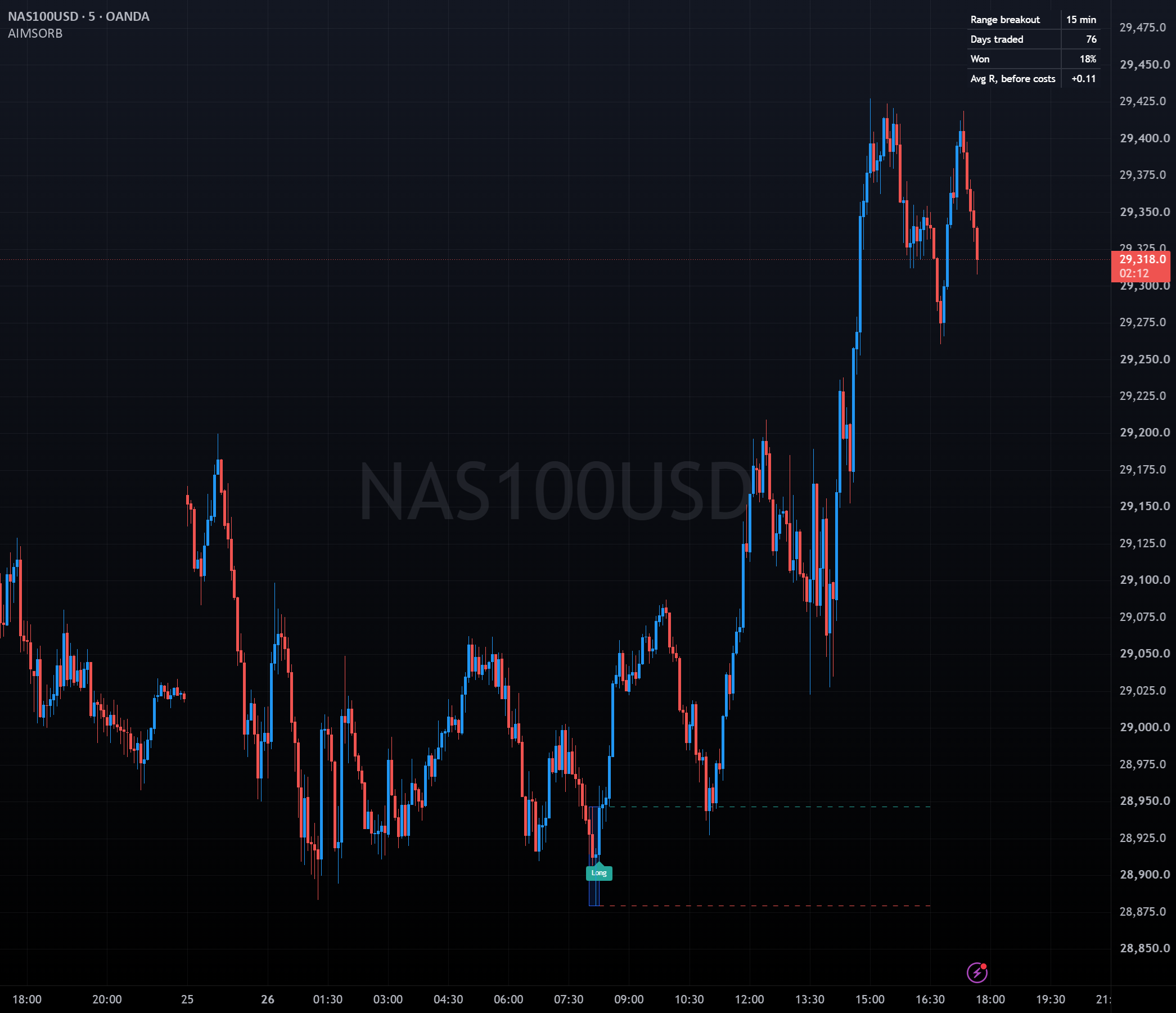
The opening range breakout is one of the oldest intraday rules. Opening Range draws the range in the exchange's own time zone, marks the first break, and scores the rule on your chart so you can see whether it holds up on your market.
The range in exchange time
Boxes the first 5, 15, 30 or 60 minutes after the open, in Berlin, London, New York, Tokyo or Sydney time, with daylight saving handled.
The first break
Stop orders sit beyond the range high and low. The first one filled is the trade, with its stop at the other side of the range, flat at the close.
The tally
Days traded, win rate and average R before costs, over the chart's history. Days where both levels are hit in one bar are marked and not scored.
How to trade Opening Range
Set the exchange and session
Pick the exchange time zone and its open and close (defaults: Europe/Berlin, 9:00 to 17:30). On MT5, also set "Server time = New York time + hours" to your broker's offset.
Use a chart no longer than the range
A 15-minute range needs a chart of 15 minutes or less. On longer charts MT5 shows a note instead of the range.
Wait for the range to close, then the first break
Once the range is complete, the first bar to trade through the high (plus any entry offset) marks a BUY break; through the low, a SELL break. Only the first break of the day counts.
Check the tally before you act
The tally scores the rule in R: a full stop is -1R. If the average R is near zero or negative on your market, the breakout has no edge there.
Prompts, not trade instructions. A SETUP READY prompt tells you to review the structure on a closed candle. It is never a command to enter blindly.
Setups and chart grammar
Opening Range draws one box, two entry levels and three kinds of marker.
| Setup | Context | What the indicator sees | Goal |
|---|---|---|---|
| Range box | Open to open plus the range minutes | Box over the range, then dashed entry levels above and below it to the close | Fix the levels for the day |
| BUY break | First bar through the high plus offset | Marker below the bar, in the long colour | Long, stop at the range low, flat at the close |
| SELL break | First bar through the low minus offset | Marker above the bar, in the short colour | Short, stop at the range high, flat at the close |
First break above the opening range high.
First break below the opening range low.
Both levels hit in the same bar. Not scored.
Settings
| Input | Type | Default | What it does |
|---|---|---|---|
| Exchange Time Zone | String | Europe/Berlin | Europe/Berlin, Europe/London, America/New_York, Asia/Tokyo or Australia/Sydney. |
| Open | Integer | 9 : 0 | Session open, hour and minute, in exchange time. |
| Close | Integer | 17 : 30 | Session close, hour and minute, in exchange time. Open trades are closed here. |
| Range (minutes) | Integer | 15 | 5, 15, 30 or 60 minutes after the open. |
| Entry Offset (price units) | Float | 0.0 | How far beyond the range the stop orders sit, e.g. 1 on GER40. |
| Show Tally | Boolean | true | Shows the tally table. |
| Range Color | Color | #2962ff | Colour of the range box. |
| Long Color | Color | #26a69a | Colour of BUY breaks. |
| Short Color | Color | #ef5350 | Colour of SELL breaks. |
| Input | Type | Default | What it does |
|---|---|---|---|
| InpSerialKey | string | "" | Your serial key from the member portal. The indicator stays locked without it. |
| InpServerNyPlus | int | 7 | Server time = New York time + hours. |
| InpZone | enum | Europe/Berlin | Exchange time zone: Europe/Berlin, Europe/London, America/New_York, Asia/Tokyo or Australia/Sydney. |
| InpOpenH | int | 9 | Open hour, exchange time. |
| InpOpenM | int | 0 | Open minute. |
| InpCloseH | int | 17 | Close hour, exchange time. |
| InpCloseM | int | 30 | Close minute. |
| InpRangeMin | enum | 15 | Range: 5, 15, 30 or 60 minutes. |
| InpOffset | double | 0.0 | Entry offset beyond the range, in price units (e.g. 1 on GER40). |
| InpShowStats | bool | true | Show tally. |
| InpDrawDays | int | 120 | Days of history to draw. The tally uses all of the chart's history. |
| InpAlerts | bool | true | Alert on a break. |
| InpRangeColor | color | C'41,98,255' | Range colour. |
| InpLongColor | color | C'38,166,154' | Long colour. |
| InpShortColor | color | C'239,83,80' | Short colour. |
Use it in your EA
On MetaTrader you can read the levels and setup state from an Expert Advisor with iCustom().
// MQL5 — check the last closed bar for an opening range break
int    h = iCustom(_Symbol, _Period, "iTradeAIMS\\AIMSOpeningRange", "YOUR-SERIAL-KEY");
double up[], dn[];
CopyBuffer(h, 0, 1, 1, up);   // != EMPTY_VALUE: BUY break on that bar
CopyBuffer(h, 1, 1, 1, dn); // != EMPTY_VALUE: SELL break on that bar| Buffer | Name | Value |
|---|---|---|
| 0 | Long break | Bar low on the BUY break bar; EMPTY_VALUE elsewhere |
| 1 | Short break | Bar high on the SELL break bar; EMPTY_VALUE elsewhere |
| 2 | Both levels in one bar | Bar high when both levels are hit in one bar; EMPTY_VALUE elsewhere |
Frequently asked questions
Check your own market with the tally. In our testing on GER40 from 2016 to 2026, none of the range lengths beat random entries. The indicator shows the rule honestly; it does not promise an edge.