Effective Trade Management & Autonomous EA Protection
Entering a good setup is only half the battle—how you manage your stop loss and partial profits after entry determines your long-term equity curve.
TM Pro gives you two layers of trade management:
- Autonomous EA Protection Rules (configured before or after entry on the Trade tab) that execute inside MetaTrader on every tick, even if you close the TM Pro desktop app.
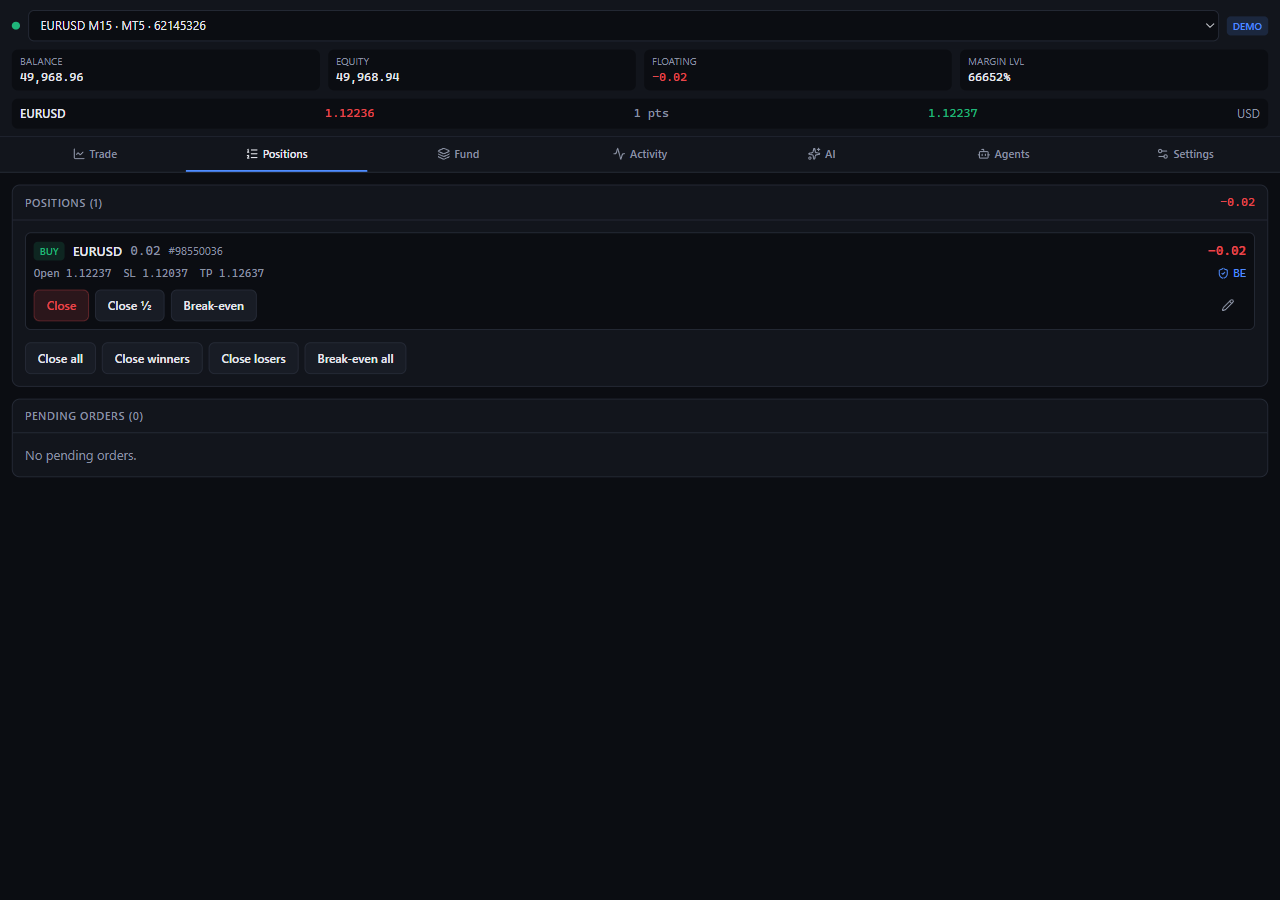
- 1-Click Position Controls on the Positions tab (
BE,Close ½,Close, and two-clickClose all).
Why "Runs in the EA" Is a Game-Changer
Many external trade managers only monitor your trades while their desktop window is open. If your laptop goes to sleep or you close the app, your break-even or trailing stop never fires.
TM Pro solves this at the architectural level:
- Whenever you place a trade (or toggle a rule in the Management (runs in the EA) card), TM Pro sends a
set_protectioncommand to theTMProExpert Advisor attached to your MetaTrader chart. - The EA immediately saves your rules to disk inside MetaTrader (
MQL5\Files\TMPro\rules-<login>-<symbol>.tsv) and evaluates them on every incoming broker tick. - Even if you close the TM Pro desktop app—or if MetaTrader restarts—the EA reloads its saved rules automatically on startup and continues protecting your open trades.
The 3 Autonomous Protection Rules
Inside the Management (runs in the EA) card on the Trade tab, you can enable any combination of three rules:
| Protection Rule | What It Does | How the EA Executes It |
|---|---|---|
| 1. Break-even | Moves your Stop Loss to Entry Price + Offset once floating profit reaches your trigger distance. | When profit reaches Trigger pips (e.g., 15 pips), the EA modifies your Stop Loss to Entry + 1 pip so a winning trade cannot turn into a loss. |
| 2. Trailing stop | Ratchets your Stop Loss behind the highest favorable price reached by the trade. | Once the trade is in profit by at least Trail pips (e.g., 20 pips), the EA keeps your Stop Loss 20 pips behind the peak price—never widening it backward. |
| 3. Close 50% | Closes half of your position volume automatically at your first profit target. | When floating profit reaches Trigger pips (e.g., 25 pips), the EA closes 50% of the lots into realized cash and records a completion flag on disk so it never double-closes. |
The "Free-Ride Runner" Playbook (How Pros Combine All Three)
Want to bank consistent cash on normal moves while still catching huge 5R+ trend days? Use this three-part structure:
- Set
Close 50%andBreak-evento the same1Rtrigger (for example,20 pipsif your initial Stop Loss is20 pips):- The moment price moves
+20 pipsin your favor, the EA banks half your position into realized profit and simultaneously moves the Stop Loss on the remaining half to Break-Even (+1 pip). - At this point, you have locked-in profit in the bank and zero risk on the remaining runner.
- The moment price moves
- Set
Trailing stopslightly wider than1.2x ATR(for example,25 pipsbehind):- Your remaining
50%runner now trails behind the trend automatically, giving the market room to breathe on pullbacks while locking in more profit every time price makes a new high or low.
- Your remaining
Not sure whether 15 pips or 30 pips is right for today's volatility on Gold (XAUUSD) vs. Euro (EURUSD)? Click Apply Setup on the AI Quant Regime & Alpha Radar card—it automatically sets Break-Even to 1.0x ATR and Trailing Stop to 1.2x ATR for the exact symbol and timeframe on your chart!
Manual Position Management (Positions Tab)
Switch to the Positions tab at any time to manage individual open trades or pending orders:
BEButton: Immediately moves that position's Stop Loss to its entry price (only clickable once the position is currently in profit so the broker accepts the stop).Close ½Button: Immediately closes50%of that position's current lot volume at market.CloseButton: Immediately closes100%of that position at market.- Bulk Actions (
Break-even winners&Close all):- Break-even winners: Moves every profitable position on the current symbol to break-even in one click (two-click confirm).
- Close all: Closes every open position on the current account (requires two clicks:
Close all→Confirm: Close all).