Troubleshooting
Use this page when BananaEA is attached but something is not behaving as expected. The setting names below use the labels users see in the Inputs tab, not internal variable names.
EA Is Not Trading
Check The Basics First
- Confirm MT4 AutoTrading is green.
- Confirm the chart symbol and timeframe match the preset.
- Confirm the market is open.
- Check the MT4 Experts tab for the latest BananaEA message.
- Load a tested preset before changing many inputs manually.
Outside Trading Hours
Check these Inputs-tab labels:
- Enable Trading Hours Control
- Enable Session 1
- Session 1 Start Hour
- Session 1 Start Minute
- Session 1 End Hour
- Session 1 End Minute
- Enable Session 2
- Session 2 Start Hour
- Session 2 Start Minute
- Session 2 End Hour
- Session 2 End Minute
If Enable Trading Hours Control is on, new entries only happen inside enabled sessions. Existing trades continue to be managed.
Too Many Filters
If signals are rare, review:
- Enable Fast EMA Filter
- Enable Slow EMA Filter
- Enable Slowest EMA Filter
- Enable Moving Average Crossover Filter
- Use Daily Range Filter
- Use Session Movement Filter
- Use Open Price Filter
When troubleshooting, change one filter group at a time.
Lot Size Looks Wrong
Check the lot-sizing labels confirmed from source:
- Lot Method
- Risk Per Trade (%, $, or lots based on method)
- Maximum Open Trades
- Allow Multiple Trades (Scaling In) in legacy V4 builds
- Scale-In Mode in newer builds
For beginners:
Lot Method: % Risk
Risk Per Trade: 1.0
Maximum Open Trades: 1 or 2
Scaling: Off
If the lot size still looks wrong, check broker contract size, minimum lot, lot step, symbol digits, and tick value on a demo account.
Orders Do Not Execute
Common causes:
- Insufficient margin: reduce risk or use a smaller position.
- Spread too wide: wait for normal spread.
- Market closed: wait for the broker session to open.
- Maximum Open Trades reached: close positions or raise the limit only after checking exposure.
- Trading disabled by broker: check the MT4 Journal and account permissions.
Constant Stop-Loss Modifications
If trailing stop updates too often, increase:
- Minimum Movement to Trail (pips)
If you do not need trailing on that set, use:
- Trailing Stop Method: Disabled
Daily Drawdown Alerts
If BananaEA halts because of daily loss protection, review:
- Enable Daily DD Control
- Max Daily Loss %
- Close All Trades on DD
- Alert: Daily Drawdown Warnings
Do not raise drawdown limits just to continue trading after a bad session. Wait for the reset or review the preset on demo.
MT4 Dashboard Or Buttons Look Wrong
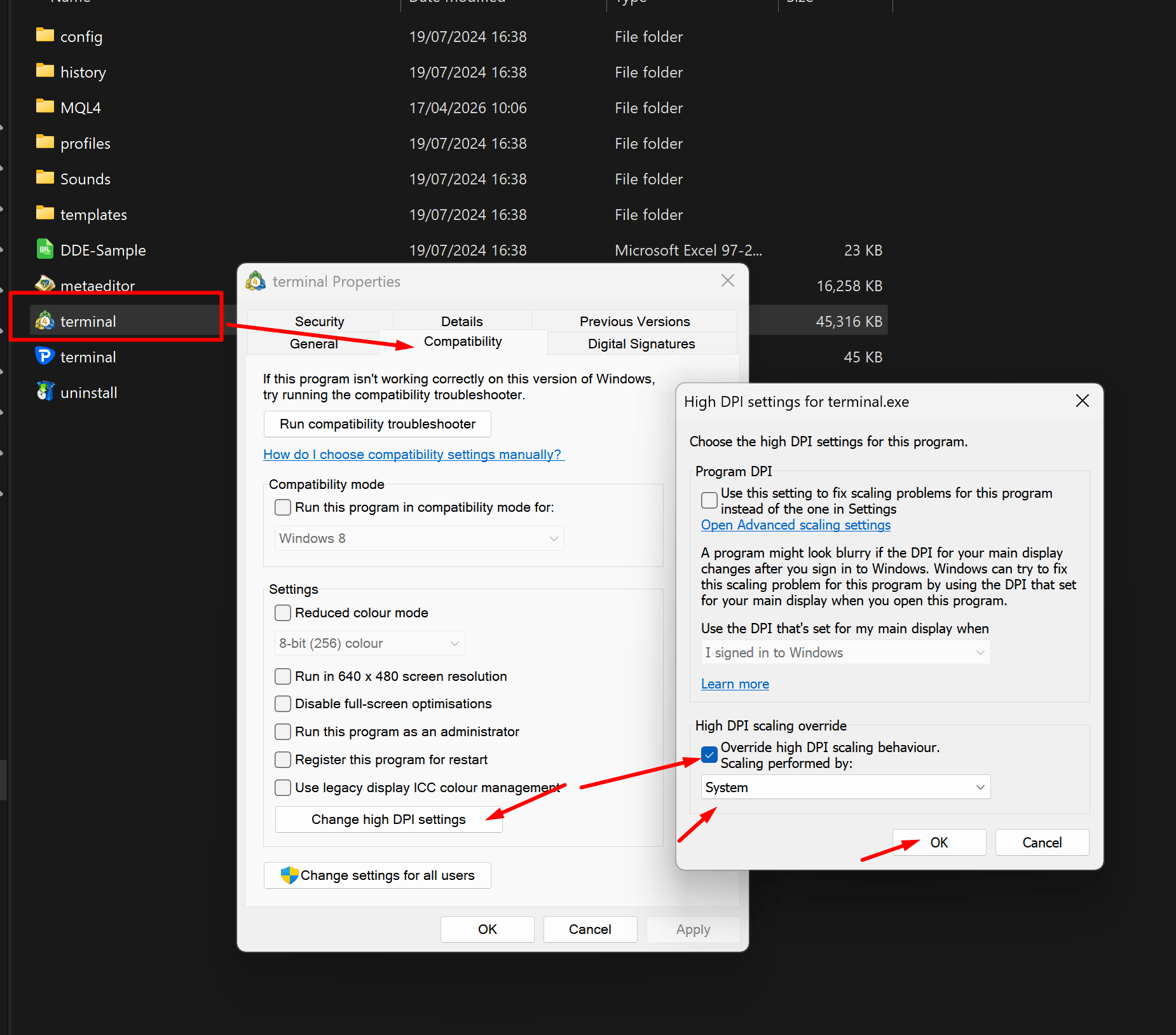
This is usually a Windows High DPI scaling issue.
- Close MT4.
- Open the MT4 installation folder.
- Right-click
terminal.exe. - Choose Properties.
- Open Compatibility.
- Click Change high DPI settings.
- Tick Override high DPI scaling behaviour.
- Set Scaling performed by to System.
- Click OK, Apply, then OK.
- Re-open MT4 and attach BananaEA.
Backtest License Warning
If Strategy Tester shows an invalid or expired backtest license:
- Check
MQL4/Libraries. - Confirm the current BananaEA backtest license file is installed.
- Download the latest package from the customer portal if the file is old.
- Restart MT4.
The documented V4 package may include a 6-month backtest license file. Always use the latest file from the portal rather than relying on an old copied package.
Preset Files Not Loading
- Confirm preset files are in
MQL4/Presets. - Restart MT4 after copying files.
- Open EA properties, then choose Load on the Inputs tab.
- Select the matching
.setfile for your symbol and timeframe.
Preset filenames can change between releases. Use the latest customer portal download.
Multiple Trades In The Same Direction
For legacy V4 builds, check:
- Allow Multiple Trades (Scaling In)
- Maximum Open Trades
For newer builds, check:
- Scale-In Mode
- Maximum Open Trades
To restrict exposure, turn scaling off and keep Maximum Open Trades low.
Pending Orders Keep Getting Cancelled
Common causes:
- pending order expiry after a number of bars
- session-close pending order cancellation
- opposite signal cancellation
- an EMA invalidation rule in newer builds
Check the pending order settings in Pending Orders.
Useful MT4 Error Codes
| Code | Meaning | What to check |
|---|---|---|
| 130 | Invalid stops | Broker minimum stop distance |
| 131 | Invalid trade volume | Minimum/maximum lot size and lot step |
| 132 | Market closed | Broker market hours |
| 133 | Trading disabled | Account and symbol permissions |
| 134 | Not enough money | Margin and risk settings |
| 136 | Off quotes | Connection and price feed |
| 138 | Requote | Market speed and slippage |
Before Contacting Support
Gather:
- BananaEA version from the Experts tab
- MT4 build from Help > About
- broker name and account type
- chart symbol and timeframe
- preset file name
- screenshot of the chart
- screenshot of the Inputs tab
- relevant Experts or Journal messages