Confluence Reads
After you attach the Confluence Indicator, the dashboard shows combined sections in addition to the Box, Banana, and Wave tabs. These sections interpret facts from connected products — they do not replace the component tabs.
Read Confluence status model first for WAIT / ARMED / TRIGGERED and quality tiers.
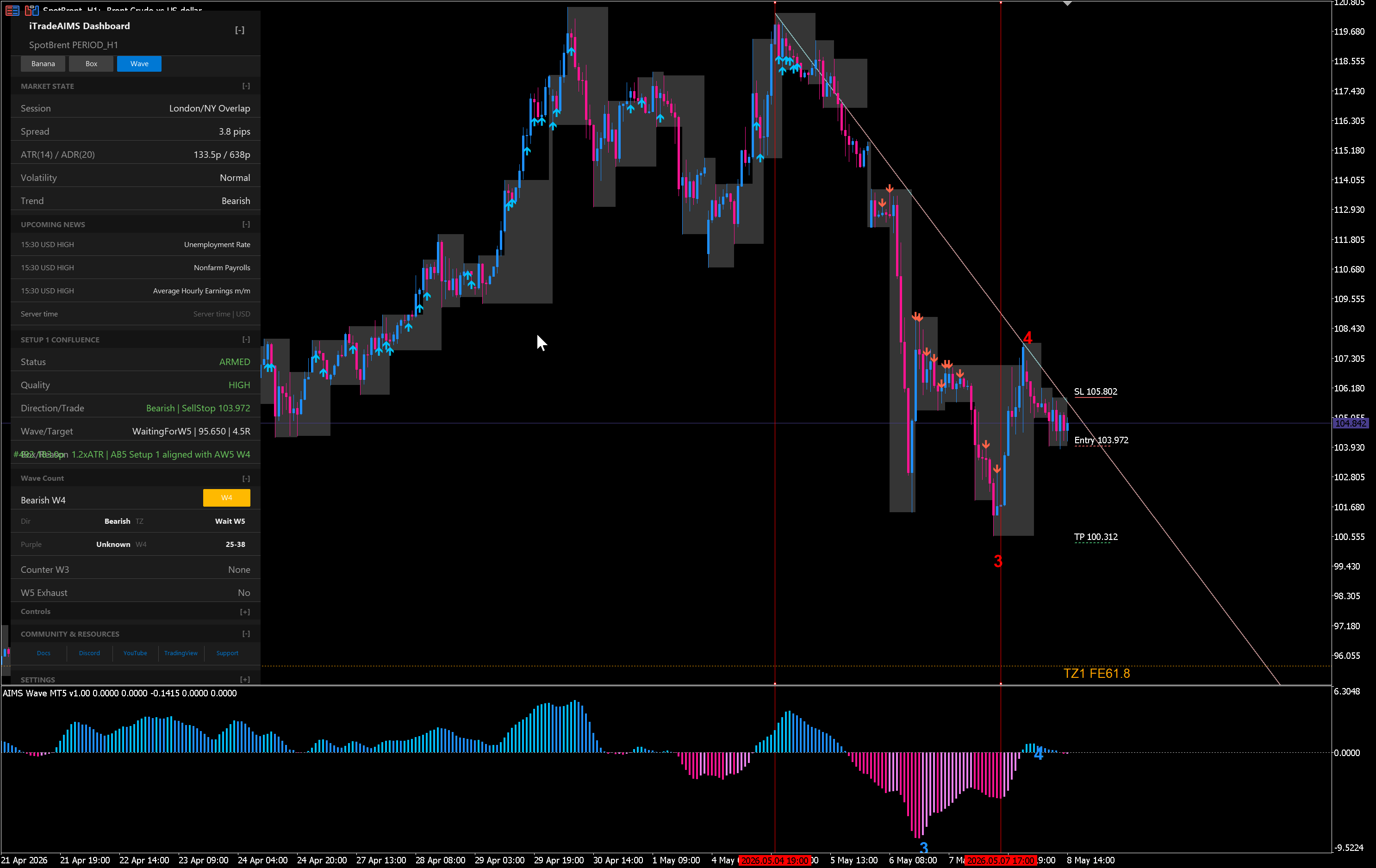
Setup 1 Confluence
Purpose: Fuse AIMS Wave structure with AIMS Box Setup 1 lifecycle.
Typical fields you may see:
| Field | What it reflects |
|---|---|
| Status | WAIT · ARMED · TRIGGERED for the combined setup |
| Quality | HIGH · CAUTION · AVOID · UNKNOWN |
| Direction | Buy / sell bias when wave and box agree |
| Wave / target | Stage (for example Wave 4) and room toward next target |
| Box / reason | Ready, blocked, or filter-related reason from box lifecycle |
| What's next | Plain-language watchlist — for example waiting on Banana |
How to use it:
- Confirm Box tab — is Setup 1 actually READY or Blocked?
- Confirm Wave tab — does wave stage support the direction?
- Read Quality — extension or marginal target room often lands in CAUTION.
- Act only after your plan, risk, spread, and news checks — even on TRIGGERED + HIGH.
When Box shows Setup 1 · READY and Setup 1 Confluence shows ARMED with CAUTION, you have a valid structure with a downgrade reason — not a contradiction.
Banana Confluence
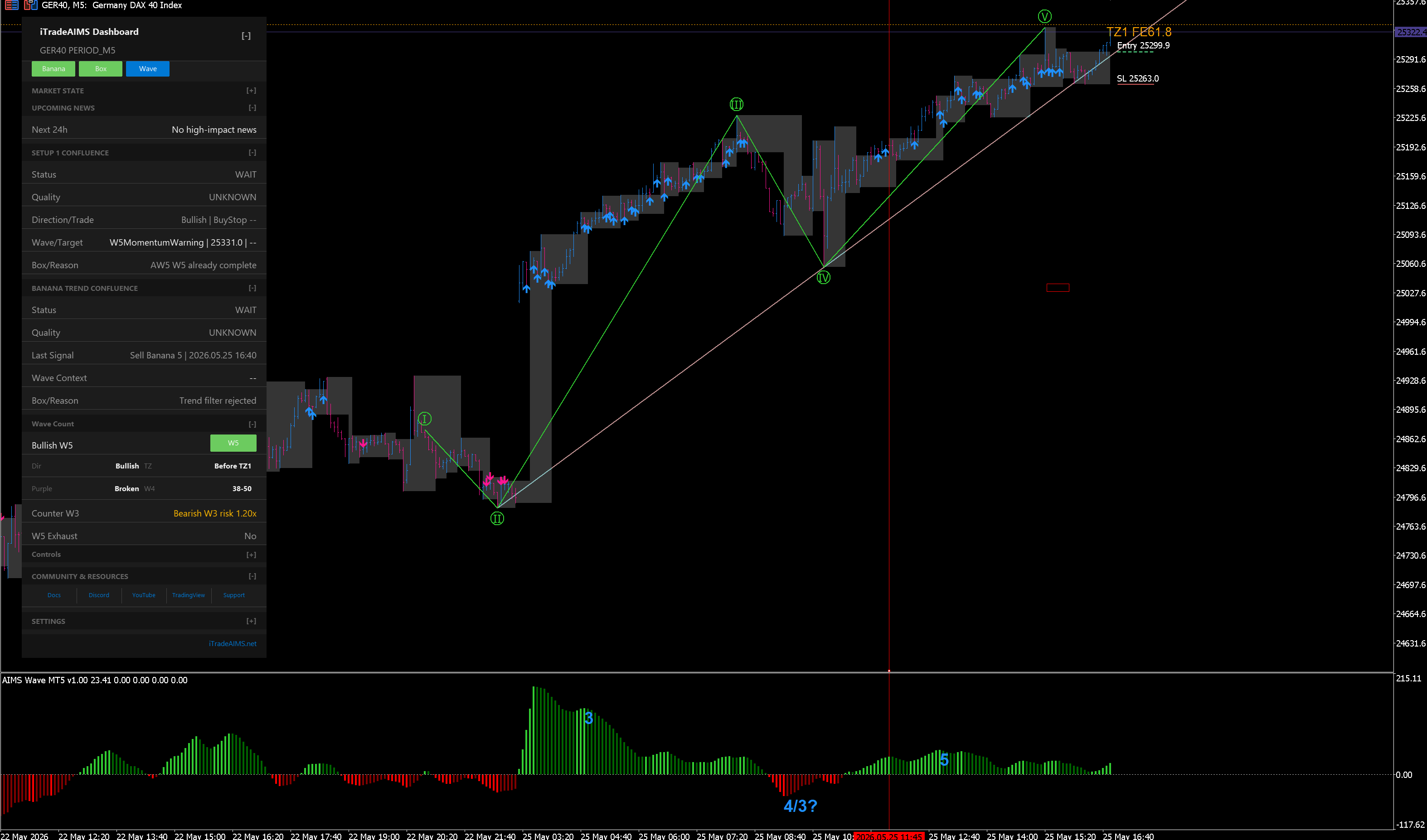
Purpose: Show whether Banana or Seed pullback facts support the wave and box story.
Typical readings:
| Read | Meaning |
|---|---|
| Continuation | Pullback context supports the prevailing wave + box direction |
| Add-on | Secondary alignment — still review sizing and structure |
| Waiting | No Banana pullback signal yet — confluence may stay ARMED, not TRIGGERED |
| Conflict | Banana facts disagree with wave or box — often CAUTION or AVOID |
Cross-check the Banana tab Last signal and signal validation flowchart. INVALID on the Banana tab should weigh against aggressive interpretation of Banana Confluence.
When the tab shows VALID but Banana Confluence shows AVOID, wave or Bubble timing usually overrode the arrow — see Chart examples.
Wave context
Wave information appears on the Wave tab and inside Setup 1 Confluence rows. Use both:
- Tab — raw wave count, targets, histogram, on-chart labels.
- Confluence row — how wave stage affects quality and direction for the combined setup.
Late-wave extension into target zones often produces CAUTION even when Box looks READY.
Bubble / regime
When AIMS Bubble is attached and enabled, settings can show regime on the chart. Confluence may include a Bubble timing or regime field.
If Bubble is not on the chart, expect — or N/A — not an error.
Opt-in alerts
Confluence can alert on lifecycle transitions (for example ARMED → TRIGGERED). Alerts default off.
Enable only when you already read the dashboard without alerts. Alerts are prompts to open the panel and review — they do not place trades.
Worked review sequence (checklist)
Before any trade decision:
- License pills — all needed products live?
- Box tab — Setup state and filters (Blocked?).
- Wave tab — stage and counter-wave risk.
- Banana tab — last signal validity.
- Setup 1 Confluence — status + quality + What's next.
- Banana Confluence — supports or waits?
- Your plan — stop distance, size, session, news.
High-quality signal (method summary)
In suite training material, a high-quality alignment often means:
- Genuine Setup 1 on Box (not Blocked).
- Confluence agrees it is Setup 1 quality (not merely a lone tab state).
- Banana and wave context do not contradict without a documented reason to stand aside.
That is a review standard, not a guarantee.