AIMS Liquidity Box
AIMS Liquidity Box is a TradingView indicator in the AIMS Box family. It answers a question a plain box cannot: is this setup forming somewhere the market already cares about?
On the chart it is listed as iTradeAIMS | AIMS Liquidity Box (short title AIMS Liq Box).
SETUP READY means: if this fits your plan, place a pending Buy Stop or Sell Stop. The indicator does not place trades, size positions, or replace your plan. Not financial advice.
The S&R zones, sweep/break markers, and At S&R confluence are TradingView-only. MetaTrader Box does not ship this liquidity layer yet — do not expect MT5 parity for those features.
What you get
Liquidity Box runs two engines, then a small bridge between them:
| Layer | What you see | What it is for |
|---|---|---|
| Structure | Grey boxes; Setup 1 / Setup 2 | The same pending-order model as Box Super: when a setup is ready, place a Buy Stop at the box high or a Sell Stop at the box low. Stop = opposite edge. |
| Liquidity (S&R) | Teal support / red resistance bands | Persistent levels built from swings — where price has been touched, swept, or broken. |
| Confluence | ★ S&R on the setup · dashboard At S&R | Flags when the pending entry sits near an active S&R level (or a fresh sweep). Optional hard filter: Only arm setups near S&R (off by default). |
You will not see AIMS Gator lines or Banana-style candle colouring on this script. Those belong to other products. Liquidity Box stays in the structure lane — boxes plus S&R context.
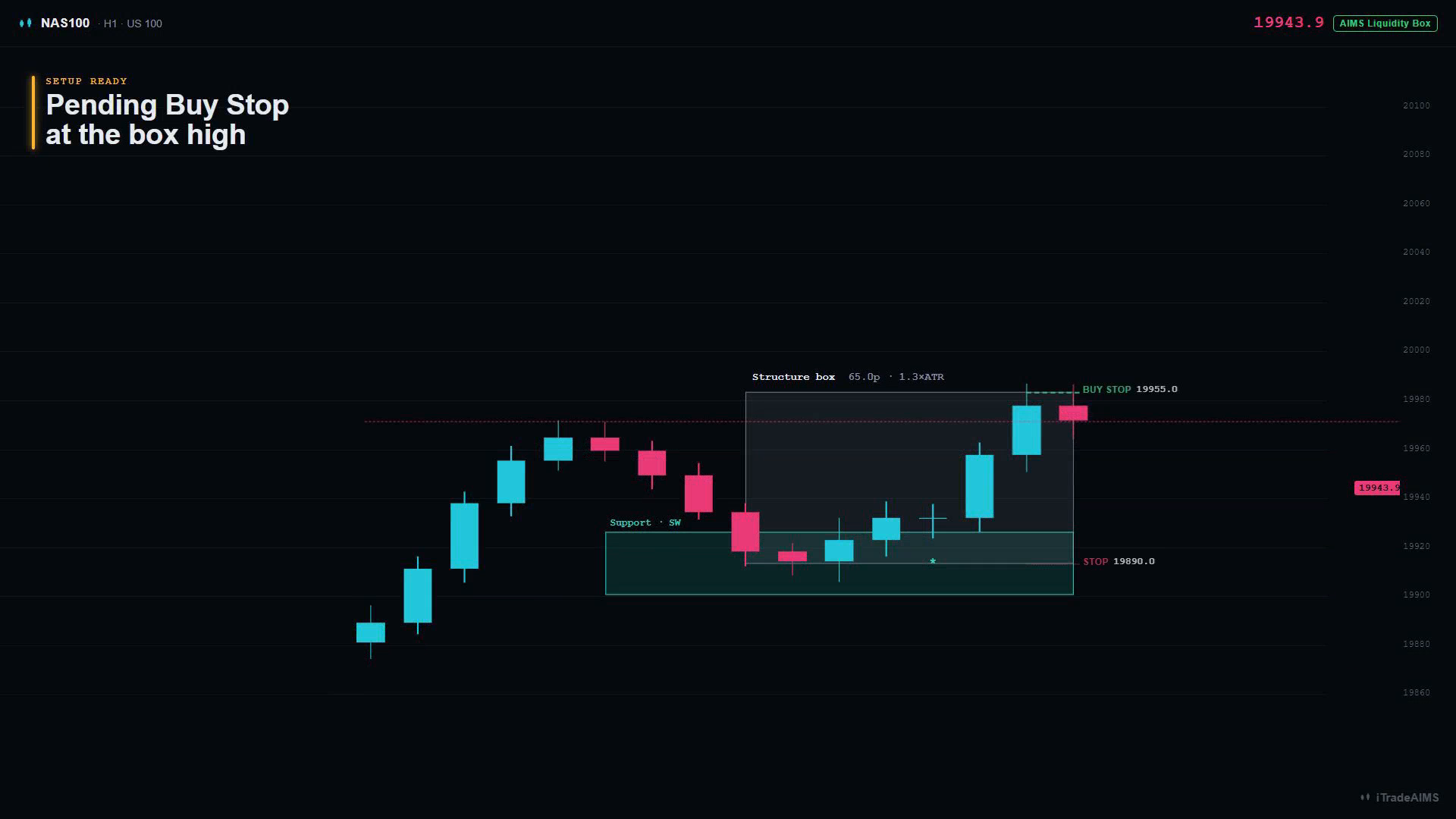
How a setup works (plain English)
- A box forms between a confirmed fractal high and low.
- When price is inside the box, the internal bias filters agree, and the box is not oversized, the dashboard moves to Ready - Setup 1 or Ready - Setup 2.
- That is your cue to consider a pending stop:
- Long → Buy Stop at the top of the box
- Short → Sell Stop at the bottom of the box
- Stop loss → the opposite edge of the box (that height is your 1R)
- TP1 / TP2 → multiples of that same height (defaults 1× and 2×)
- After that:
- Triggered — price hits the pending edge; levels freeze on the chart
- Invalidated — a new box takes over, or the opposite edge breaks first
The S&R layer does not invent a second signal type. It only annotates (and can optionally gate) the same SETUP READY moment.
Support & Resistance in one minute
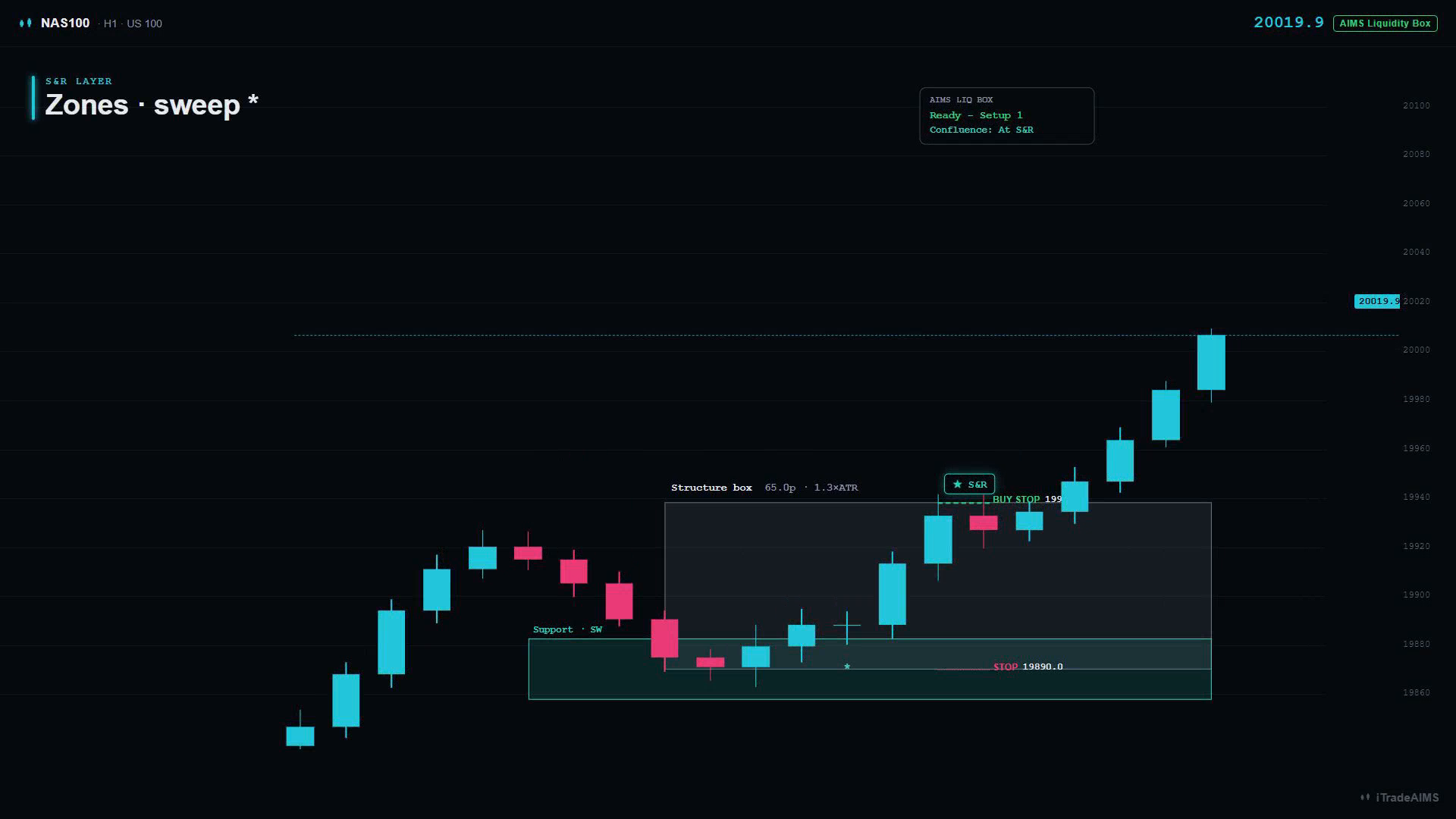
| Marker / label | Meaning |
|---|---|
| Teal / red zones | Support and resistance bands around swing prices |
| Strength label T / SW / D | Touches · Sweeps · Duration (bars) |
* | Sweep — wick through the level, close back inside |
x | Break — close through the level (level is mitigated) |
Load enough history so zones have room to form. Intraday through H1/H4 are typical for box work; S&R becomes more useful with more bars on the chart.
Confluence (★ S&R / At S&R)
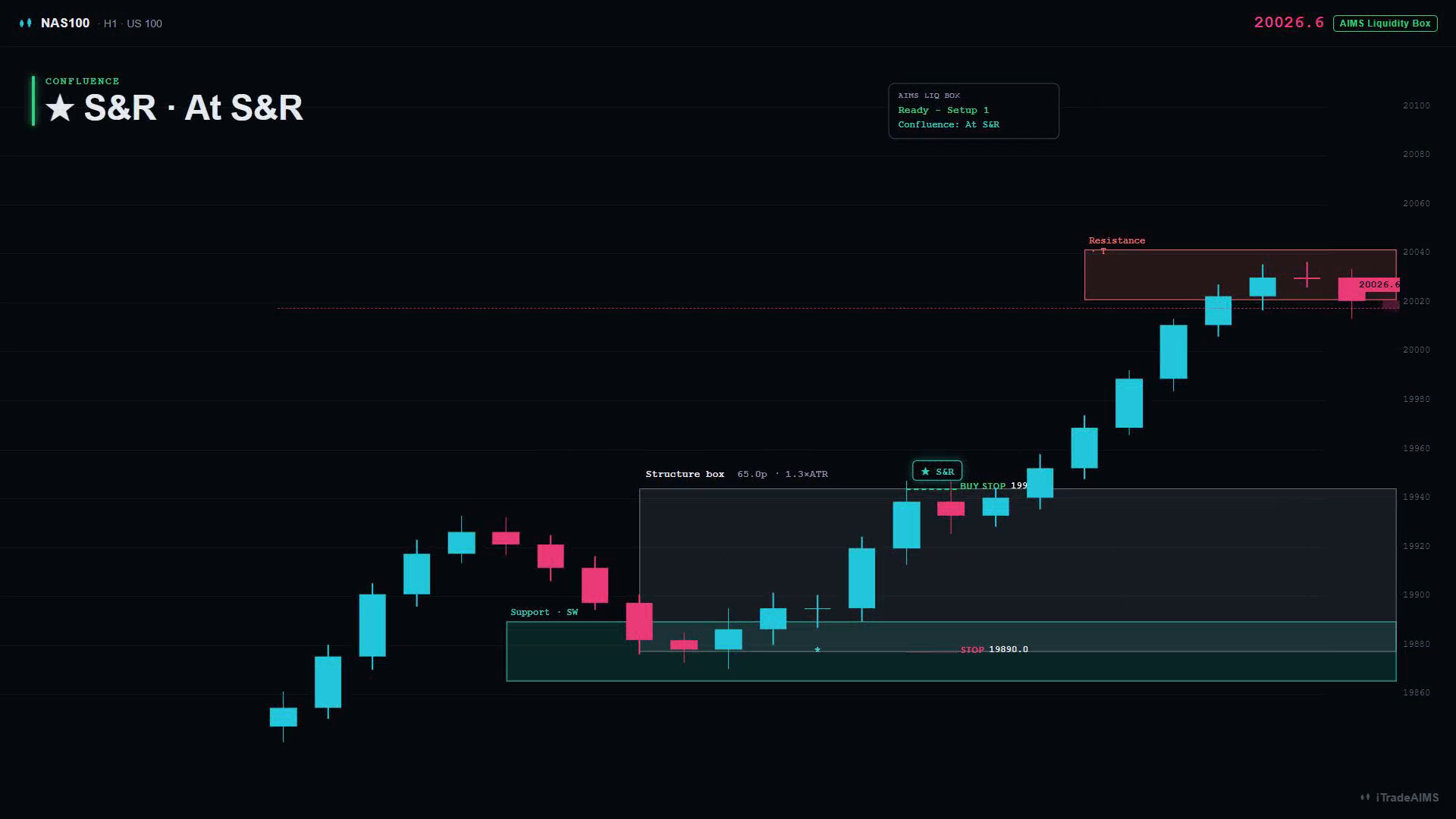
When SETUP READY fires, Liquidity Box checks whether the entry edge is near an unmitigated S&R level (within Proximity ×ATR, default 0.5), or whether a fresh sweep just happened there.
- Flagged → label shows
★ S&Rand the dashboard shows Confluence: At S&R - Not flagged → setup can still arm (unless you turn on the hard filter)
Prefer reviewing At S&R setups first. That is a filter for your attention — not a promise of results.
Which script is which?
Public structure teaser — last fractal box + optional pip-limit tint. No Setup 1/2 lifecycle.
Invite-only — full box lifecycle with visible Gator lines, mouth ribbon, settings, and trend candle tint (legacy all-in-one).
Invite-only Pro — fractal boxes, MT5-parity Setup 1/2 lifecycle, invisible Gator/Purple bias, ALMA option, volatility cloud, volume anomaly + ATR box gate, dashboard, PineConnector pending-order alerts.
Structure-only Setup 1/2 lane — invisible Gator/Purple bias validation, no gator lines, no candle tint. Open the Box Super docs while the TradingView URL is pending.
Box Super structure plus Support & Resistance zones and ★ S&R confluence. Open the Liquidity Box docs while the TradingView URL is pending.
| Script | Role for beginners |
|---|---|
| Free / Advanced / PRO | Existing Box editions — start at Start on TradingView |
| AIMS Box Super | Structure-only sibling (core of Liquidity Box) — publish pending · Box Super docs |
| AIMS Liquidity Box | Super-style structure plus S&R + confluence |
A companion AIMS Liquidity Box (Strategy) script may appear for Strategy Tester practice. Strategy results are historical simulations only — not a promise of future performance.
Access
Confirm your grant at my.itradeaims.net → License Center, then open the script from your TradingView access list or the iTradeAIMS profile.
Until a public script URL is listed above, treat Liquidity Box as invite / publish pending. Do not use a guessed TradingView link.
Next steps
- Liquidity Box quick start — attach and read your first chart
- Liquidity Box settings — every input group in plain language
- Liquidity Box alerts — alerts at SETUP READY
- Shared Box TV help: Troubleshooting